Export from Design Project
You can export different files by different ways from you design project.
Save the design view as image file
- A design project is open.
- The pattern has a design which you want to save as image file.
- 107
- Open the context menu of the design view with the RMB.
- 108
- Click the 导出为图像文件... menu item.
- 109
- Select the file format of the image, enter a name, select the path and save it.
- The complete design view is saved.
Save fabric view as image file
- A design project is open.
- 110
- Open the context menu of the fabric view with the RMB.
- 111
- Click the 导出为图像文件... menu item.
- The following dialog box appears with settings about saving:
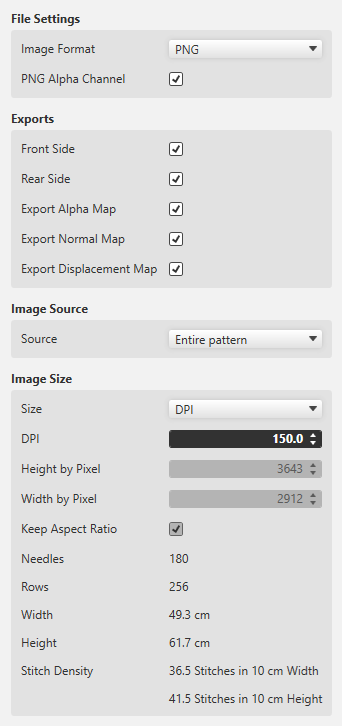
照片格式
-
PNG with or without transparency
 Export the fabric view for further processing to a 3D apparel software always as PNG with enabled transparency (PNG Alpha 通道).
 -
JPG with specification of the quality
The fabric view as JPG is always exported with a black background.
导出 (Variants)
So-called Maps are used for the 3D visualization and 3D simulation to assign two-dimensional images to the three-dimensional surfaces of the models.
The different types of Maps give a more detailed and realistic appearance to the computer generated 3D models.
- 前侧
- 后侧
- 初始视图
- An alpha Map contains information about transparent areas of a texture.
In a 3D software it is required to define the transparent space. - 普通视图
- Also referred to as Bump Map.
- The Normal Map specifies the angle, with which virtual light is reflected over a digital surface.
- With it the appearance of the texture depth is simulated.
- The Normal Map is a necessary part of digital textures in a 3D software.
- 移位视图
- Also referred to as Height Map.
- A Displacement Map can artificially generate an additional height of a digital texture.
- This way, a more realistic appearance of three-dimensional surface structure results within a 3D model.
图片来源
- 整个花型
- Select, if a complete fabric is to exported.
- 所选区域
- Exports only the desired, selected section of a pattern.
This function is helpful in case cycles are to be used in a 3D apparel software. - 当前图像截图
- Exports only the area that currently appears in the document window of the fabric view.
- 保持纵横比
- The size ratio of the pattern is maintained.
Create a new pattern project from the design.
You can create a new pattern project within CREATE PLUS only.
This selection is not available in the CREATE DESIGN
.
- You are working with CREATE PLUS
- A design project is loaded and ready to export.
- 112
- Click
 新花型项目 in the 导出 group of the 起头 ribbon tab.
 - The 根据设计花型新建设计项目 dialog box appears.
- 113
- Select machine in the 根据设计花型新建设计项目 dialog box.
- 114
- Enter the pattern name.
- 115
- Switch the comb for the start on or off.
- 116
- Select the desired design from the Design Project.
- A new pattern project will be created.
Render a Fabric Piece
You can save your Design for 3D simulation.
- A design project is open.
- 117
- Click
 呈现织片 in the 导出 group of the 起头 ribbon tab.
- The 导出 dialog box appears with settings about rendering.
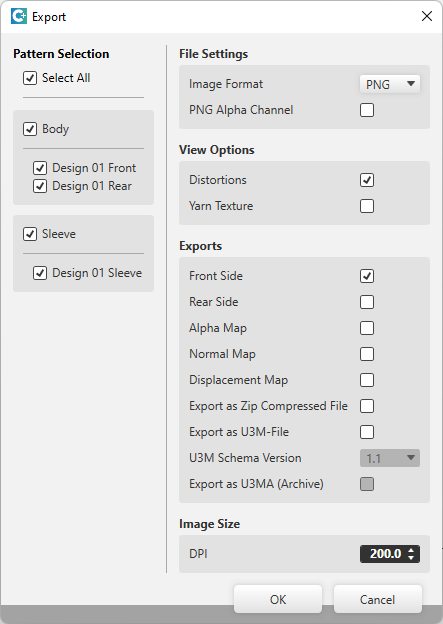
花型选择
- Select the desired patterns for export.
文件设置
照片格式
-
PNG with or without transparency Export the fabric view for further processing to a 3D apparel software always as PNG with enabled transparency (PNG Alpha 通道).
-
JPG with specification of the quality
The fabric view as JPG is always exported with a black background.
视图选项
- 变形
- Shows the stitch distortion in the generated image file.
- 纱线结构
- Shows the thread in the generated image file with yarn texture.
导出 (Variants)
So-called Maps are used for the 3D visualization and 3D simulation to assign two-dimensional images to the three-dimensional surfaces of the models.
The different types of Maps give a more detailed and realistic appearance to the computer generated 3D models.
- 前侧
- 后侧
- 初始视图
- An 初始视图 contains information about transparent areas of a texture.
In a 3D software it is required to define the transparent space. - 普通视图
- Also referred to as Bump Map.
- The 普通视图 specifies the angle, with which virtual light is reflected over a digital surface.
- With it the appearance of the texture depth is simulated.
- The 普通视图 is a required part of digital textures in a 3D software.
- 移位视图
- Also referred to as Height Map.
- A Displacement Map can artificially generate an additional height of a digital texture.
- This way, a more realistic appearance of three-dimensional surface structure results within a 3D model.
- 导出为 Zip 压缩文件
- File is saved compressed
- 导出为 U3M 文件
- U3M is a standardized format for 3D visualization.
This includes physical properties data and texture maps, all combined into one ZIP file (U3MA). - U3M 架构版本
- Select the U3M schema version
- 导出为 U3M (存档文件)
- Export the files compressed in a U3MA ZIP file
图片尺寸
- DPI
- Specify the image size by DPI
Saving shapes as DXF files speichern
You can export shapes from your design project as a DXF file.
- A design project is open.
- Shapes are loaded or created
- 118
- Click
 Export as DXF File in the 导出 group of the 起头 ribbon tab.
- The Export Shapes dialog box appears.
- 119
- Select the desired shapes in the Export Shapes dialog box and confirm it.
- 120
- Enter a name and select the folder where the shapes are to be saved.
- The shapes will be saved as DXF file.