Line Options Bar
|
线宽 |
Enter the 线宽. | |
|
打印方向 |
|
所画线出现在光标左侧。 |
|
|
所画线出现在光标左右侧。 | |
|
|
所画线出现在光标右侧。 | |
|
动程 |
Set the length of the strokes of a dash line. | |
|
间隙 |
Set the length of the gaps of a dash line. | |
|
|
Create a freehand line. | |
|
|
Create a line with an even step and remainder. | |
|
|
Create line at a 45° angle. | |
|
|
Create a steady stepping. | |
|
|
根据用户自定义步进设置创建一条线。 | |


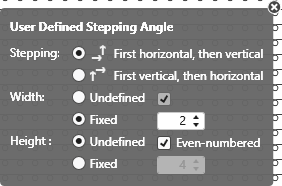
 The following settings are available for user defined lines only:
User Defined Stepping Angle
|
Stepping: |
Specify the sequence of steppings. |
|
|
Execute stepping first horizontally, then vertically. |
|
|
Execute stepping first vertically, then horizontally. |
|
宽度: |
Set the width of the steps. |
|
|
任意步宽 |
|
|
指定宽度的步宽 |
|
|
偶数列的步宽 |
|
高度: |
Set the height of the steps. |
|
|
任意步高 |
|
|
指定高度的步宽 |
|
|
偶数编织行的步高 |
|
|
恢复当前绘图工具的默认状态。 |
|
|
Apply Data of Drawing Echo to Pattern Only active with |


|
|
Select |
