Text Options Window
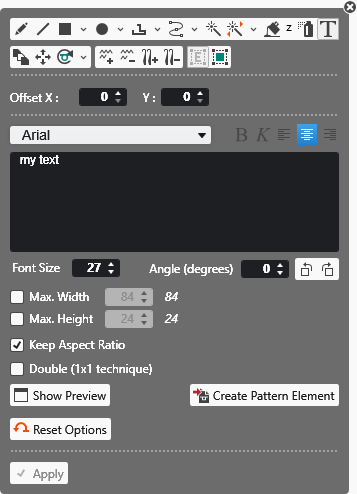
|
X 偏移 |
Draw the text by dot line.
|
|
Y 偏移 |
Draw the text by dot line.
|
|
Character Format |
Format the text. |
|
Edit Box |
Enter and view a text. |
|
Font Size |
Enter the font size. |
|
角度(度) |
Rotate the text by the specified angle. |
|
Max. Width |
Enter the maximum width of the text. |
|
Max. Height |
Enter the maximum height of the text. |
|
|
Keep the aspect ratio when drawing the text. |
|
|
The text is entered with double width. |
|
Show Preview |
Shows a thumbnail of the text according to specified settings. |
|
Create Pattern Element |
Creates a pattern element with the text and saves it to the Pattern Element tool window.
|
|
|
恢复当前绘图工具的默认状态。 |
|
|
Apply Data of Drawing Echo to Pattern Only active with |

 double-click on
 Cursor attributes selected together with the text are applied to the pattern element.

