Group 2 : Knitting-in
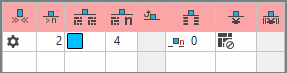
开始方向
Definition of the knitting direction for the first row of a color field

无编织带入列数
Enter the number of columns, that the yarn carrier is allowed to float over, without a knitting-in module being inserted.
The quantity refers to the technical rows.
0 = always with knit-in module.

编织带入模块
Select a knitting mode for knitting-in.
The module for knitting-in has two functions:
Repeatable knitting mode for feeding-in the yarn carrier
Knitting mode for knot or binding at the edge of the color area

By drag-and-drop is possible.

Open the selected module via the context menu.

编织带入重复宽度
Enter the module width for the knitting mode for feeding-in the yarn carrier.
The module width is repeatable.

移动脱布行
Column appears automatically if a module for knitting-in with casting-off is used

编织带入的行偏移
Specify the offset for the knitting-in of the yarn carrier before the beginning of the color area.
Related to:

  • 花型行
  • 工艺行
  • 在一个额外行

起头处锁定或打结
Select the module for knot / binding at start of a color area without knitting-in.
Entry in intarsia color areas, without assigned knitting-in module and thus no knitting-in is entered.
Example: two overlapping color areas without knitting-out and -in.

By drag-and-drop is possible.

Open the selected module via the context menu.

打结编织带入的列偏移
Move the position of a knot (module) by x columns to the left or right.
This column is displayed automatically if a module is allocated in the 起头处锁定或打结 column.