Status bar of the lined shape
Status bar of the lined shape

In the left area of the status bar are displays that refer to the cursor position.
|
|
Display of the cursor coordinates. |

You can make layout settings for the document window in the right area.
|
|
显示对称轴 |
|
|
显示线圈网格 |
|
|
显示图表轴 |
|
|
显示控制尺寸 |
|
|
显示标记点的符号 |
|
|
Hide Knitting Ranges |
|
|
显示编织区域 |
|
|
显示编织区域(纱线颜色) |
|
|
Show Knitting Ranges (CA color) |
|
|
利用键盘上的箭头键移动所选对象(模型点,标记点,编织区域或模型元素。其中模型点必须为线圈输入模式) |


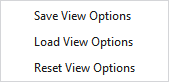
Make the following settings in the context menu of the status bar:
|
保存视图选项 |
Saves the current settings of the status bar as default. New lined shape projects will appear with the saved default settings. |
|
导入视图选项 |
Loads the default settings of the status bar. |
|
重置视图选项 |
Resets the settings of the status bar and the default setting to the STOLL default. |
请参阅...
- Working in the line table or in the document window (graphic)
- Fully Fashion-Pattern: Front with V-neck and Structure
- Fully Fashion-Pattern: Front with V-neck and Binding-off
- Fully Fashion-Pattern: Front with neckline and shoulder gore by types of shape elements
- Fully Fashion-Pattern: Back with French Shoulder
- Fully Fashion-Pattern: Fabric Piece with Multi-step Widening and Multi-step Narrowing
- Fully Fashion-Pattern: Front with V-neck and dart type of shape element
- Fully Fashion-Pattern: Front with V-neck and Knitting Ranges