Control Column Data (Find)
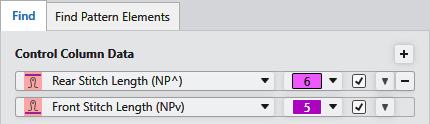
|
控制列数据
|
Select the control column that is to be found. All control columns available for the machine type can be selected, even if they do not contain entries in the pattern. |
|
值
|
Enter a value that is to be searched. All entries that are present in the control column can be selected. |
|
反向
|
Inverts the selection of the selected data. |
|
|
Adds an input line for a new search criterion. |
|
|
Deletes the corresponding input line. |
|
|
Moves the search criterion to the needle data.
If the stitch length is selected in the control columns data, then the entry is found in the control column with Find and Replace. |


 Only possible with stitch length.