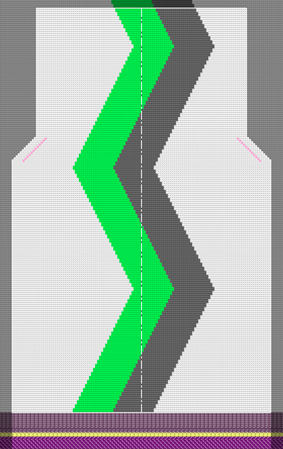
Pattern 7: SJ with Intarsia, Front without neckline

机器

  • As desired
    • Example for CMS 530 HP, E3,5.2 (classification 656)

  • 编织工艺
    • 满针
  • 填充元素
    • any yarn color
    • 带翻针前板线圈
  • 起头
    • 起头,1x1 :
    • 一个系统
    • 不使用弹力纱
    • 使安全行纱
    • 放松行

花型项目

Pattern-7.spf

线模型项目

Shape_Front.slsf

  • Pattern specific specifications with Intarsia
    • Knitting-in and out of yarn carriers
    • Border Processing
    • Intarsia Binding
  • Working in the dialog box 导纱器
  • Control Columns
    • 导纱器修正 (YC / YCI)
    • 导纱器交错排列 (YD)/(YDI)
    • 编织带出
    • 嵌花锁定

  1. Create a pattern project with one pattern.
  2. Draw basic pattern with Intarsia areas.
  3. Working with 导纱器 dialog box.
  4. Start the Technical Processing.
  5. Generate knitting program (Sintral, Jacquard, Setup).
  6. Run the Sintral Check.
  7. Load and set up the knitting program on the machine.