Context Menu of the Editing Area
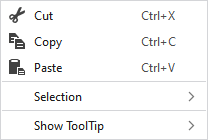
Make the following settings in the context menu of the editing area:
|
|
删除选择区域的内容并将其复制到剪贴板上。 | |
|
|
将选择区域的内容复制到剪贴板上。 | |
|
|
将剪贴板上的内容带到光标上(光标属性)。 | |
|
选择 |
MC 提花 |
Generate a new MC Jacquard from the selected area. The 新 MC 提花 dialog box appears. |
|
Select |
The functions of the menu bar 选择 are also available in the context menu. | |
|
保护 |
A selection can be protected from interventions. | |
|
显示工具提示 |
|
Activates the tooltip in the needle area. |
|
|
Activates the tooltip in the control columns. | |
|
|
The coordinates of the drawing are shown when drawing. | |


