Find and Edit / Replace
The 查找 and 编辑 / 替换 sections appear when you select a module type in the 属性 pane.
Select the module to be found in the 查找 pane. And the module to be inserted in the 编辑 / 替换 pane.
The following dialog box appears for each section:
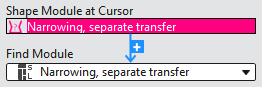
There are two ways to select the modules:
- Select a module directly in the drop-down menu.
All available modules from the database can be selected.
Only modules which are present in the pattern appear in the 查找 pane. - If you click on a module in the pattern or pick it by F7 from the pattern, then this module appears highlighted in red at 光标模型模块.
Then you can insert it by the light blue + to the selection menu.