Module preview
In the upper pane of the tool window you can see the preview of the selected module.
The possible variants of the module are displayed beside the preview. The selected variant is highlighted.
When you select a module for drawing you then select the desired variant.
The presentation of the modules has the following meaning:
Structure Modules
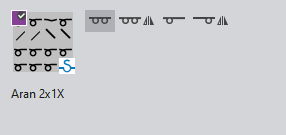
|
|
Module variant 满针 |
|
|
Module variant 满针,对称 |
|
|
Module variant 1x1 方式 |
|
|
Module variant 1x1-方式,对称 |


Narrowing Modules
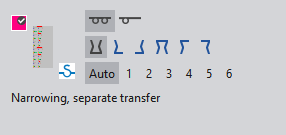
|
|
Module variant 满针 |
|
|
Module variant 1x1 方式 |
|
|
Module variant 下收针 |
|
|
Module variant 向左下收针 |
|
|
Module variant 向右下收针 |
|
|
Module variant 上收针 |
|
|
Module variant 向右上收针 |
|
|
Module variant 向左上收针 |
|
Auto |
Module variant 覆盖宽度: |
|
1 to 6 |
Module variant 覆盖宽度: |


Widening Modules
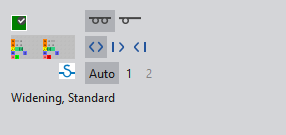
|
|
Module variant 满针 |
|
|
Module variant 1x1 方式 |
|
|
Module variant 放针 |
|
|
Module variant 向右放针 |
|
|
Module variant 向左放针 |
|
Auto |
Module variant 覆盖宽度: |
|
1 to 2 |
Module variant 覆盖宽度: |


