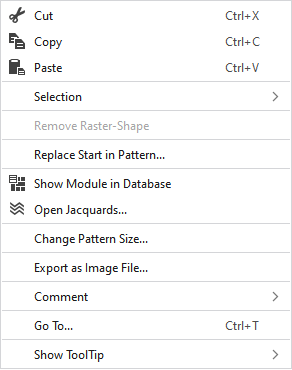
Context menu of the pattern layer
Make the following settings in the context menu of the pattern layer:
|
|
删除选择区域的内容并将其复制到剪贴板上。 | |
|
|
将选择区域的内容复制到剪贴板上。 | |
|
|
将剪贴板上的内容带到光标上(光标属性)。 | |
|
选择 |
创建提花... |
I. Generate a Jacquard area in the selected area. |
|
|
Create a pattern element from the selection. 根据现有选择区域创建一个新的花型元素,然后将其添加到“花型元素”工具窗口。 | |
|
Select |
The functions of the menu bar 选择 are also available in the context menu. | |
|
保护 |
A selection can be protected from interventions. | |
|
删除栅格模型 |
If a .spf pattern with raster-shape is imported, this function can be used to remove the raster-shape from the pattern.
| |
|
更换花型起头... |
调出更换起头对话框,选择一个或者更换起头方式。 | |
|
|
Shows the module at the cursor position in the database. | |
|
|
Opens the tool window 提花 and shows in it the Jacquard of the cursor position. | |
|
更改花型尺寸... |
Opens the dialog box where you can change the height and width of the pattern. | |
|
导出为图像文件... |
Save the design view off the whole pattern as image file. | |
|
注释 |
Place a pin, comment, or graphic anywhere in the pattern. | |
|
转到... |
Opens the 转到 dialog box. | |
|
显示工具提示 |
Make settings for the tooltip. | |


 You cannot edit a raster-shape in
