Context Menu of Pattern Elements
|
|
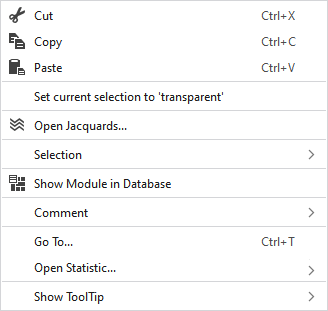
删除选择区域的内容并将其复制到剪贴板上。 | |
|
|
将选择区域的内容复制到剪贴板上。 | |
|
|
将剪贴板上的内容带到光标上(光标属性)。 | |
|
将当前选择设为“透明” |
Sets the selected area in the pattern element to transparent. | |
|
|
Opens the Jacquard at the cursor position in the Jacquard table. | |
|
选择 |
创建提花... |
Generate a Jacquard area in the selected area.
|
|
Select |
The functions of the menu bar 选择 are also available in the context menu. | |
|
保护 |
A selection can be protected from interventions. | |
|
|
Shows the module at the cursor position in the Module Explorer. | |
|
注释 |
Place a pin, comment, or graphic anywhere in the pattern. | |
|
转到... |
Opens the 转到 dialog box.
| |
|
|
Entry in 行 | |
|
|
Entry in 行 | |
|
|
Enter the 行 you want to jump to. | |
|
|
Enter the 列 you want to jump to.
| |
|
|
The jumped to result is selected. | |
|
显示工具提示 |
|
Activates the tooltip in the needle area. |
|
|
Activates the tooltip in the needle area, as well as a preview of the modules. | |
|
|
Activates the tooltip in the control columns. | |
|
|
Activates the tooltip in the control columns as well as a preview of CA and MA. | |
|
|
The coordinates of the drawing are shown when drawing. | |


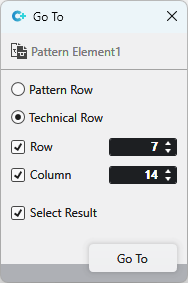

 refers to a
 With row and column enabled, the position with the corresponding coordinates is jumped to.
