SFOINIT
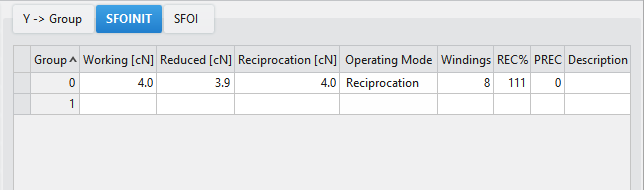
The SFOINIT tab contains the settings for the initialization of the feed wheels. The settings from the SFOINIT tab is effective as long as no SFOI entry is assigned via the control column.
Every created group receives an entry in the SFOINIT tab that can be edited specifically for the group.
If no values were entered for a group, then the values from the group 0 are effective.
|
组 |
设定一个具有相同设置的送纱器组 Quantity of feed wheel groups: Group 0 If no basic setting was defined for a feed wheel group, the values of the "Group 0" will be effective. Tip: If only one feed wheel group is used in a knitting program, you can work with the "Group 0". This has the advantage that you do not need to adjust anything in the "SFOI" tab. |
|
工作 [cN] |
No yarn is taken-up in the carriage reversal. Value range: |
|
减少 [cN] |
Normally, the reduced yarn tension is about 0.4 cN higher than the knitting or the reciprocation tension. Value range: |
|
往复卷取 [cN] |
The yarn tension is maintained constant:
Value range: |
|
操作模式 |
选择特定纱线张力的操作模式
|
|
When the machine stops (engaging rod down), the reduced yarn tension is active. Normally, the reduced yarn tension is about 0.4 cN higher than the knitting or the reciprocation tension.
| |
|
The operating mode "往复卷取" was developed specifically for the flat knitting machine. The yarn tension is maintained constant:
In the carriage reversal, the yarn length that is not needed will be restored by the feed wheel. You can adjust the reciprocation tension in the "Mode 8 / " column. Special case: Elastic yarns (e.g. Lycra) | |
|
| |
|
卷绕 |
设置卷绕在送纱器上的圈数。 Value range 1 – 40 The number of yarn windings are entered directly on the feed wheel (Mode 61). If you want to change the number of windings, enter it directly on the feed wheel (Mode 61). Then, thread-up the feed wheel again. |
|
REC% |
设定纱线回储过程中的纱线张力修正 %。 Only active with the "往复卷取" operating mode. Value range: Default 111 % Increase the value with a heavy yarn to compensate the inertia of the yarn. With a fine, sensitive yarn reduce the value so that the yarn does not break when accelerating.
|
|
Adjust the yarn tension return correction:
| |
|
PREC |
设置持续回储功能。 The take-up function prevents yarns from sagging after a machine stop. Value range 0 - 1 0 = The feed wheel works with the specified operating mode (工作, 减少, 往复卷取). 1 = The feed wheel always works with the "往复卷取" operating mode. With a machine stop the feed wheel changes to the "减少" operating mode by default. If one is working on the machine, threads can be pulled by mistake - the yarn will be sagging. If the machine is started then, it can lead to an error. Remedy: Activate the take-up function ("1"). |
|
Adjust the take-up function:
| |
|
说明 |
有关条目应用的注释。 您可以在这里输入文本。 |


 At the feed wheel, the "
 Not available for