Sections of Statistics
You will find the statistical evaluations of following sections in the dialog box:
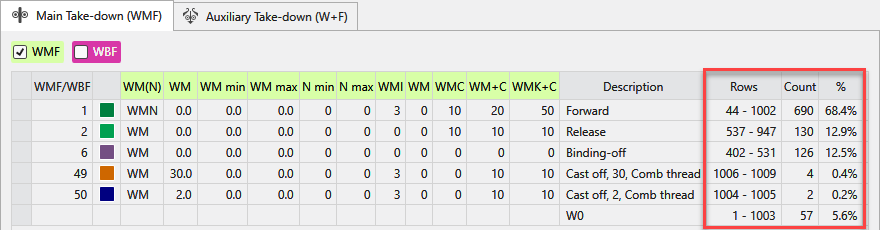
The statistical evaluations appear to the right of the setup data and entries from tool windows.
|
|
Rows |
Shows the first row and the last row with this entry. |
|
Quantity |
Shows the quantity of rows with this entry. | |
|
% |
Shows the quantity of rows in relation to the whole area. |


|
|
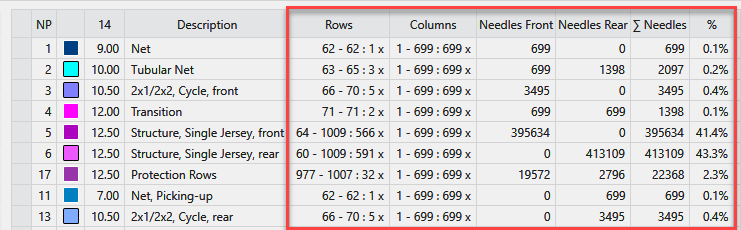
Rows |
Shows the first row and the last row with this entry. |
|
Columns |
Shows the first column and the last column with this entry. | |
|
Needles Front |
Shows the total quantity of needles of the front needle bed with this entry. | |
|
Needles Rear |
Shows the total quantity of needles of the rear needle bed with this entry. | |
|
∑ Needles |
Shows the total quantity of needles with this entry. | |
|
% |
Shows the quantity of needles in relation to the whole area. |

|
|
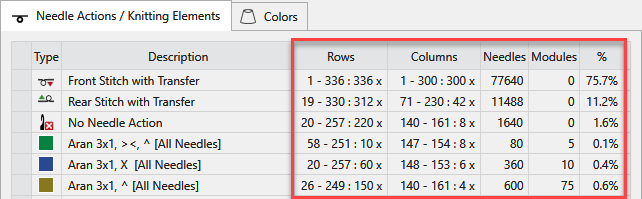
Rows |
Shows the first row and the last row and the quantity of rows with this entry. |
|
Columns |
Shows the first column and the last column and the quantity of columns with this entry. | |
|
Needles |
Shows the total quantity of needles with this entry. | |
|
Modules |
If this entry concerns modules, the quantity of modules that occur in this area is displayed. | |
|
% |
Shows the quantity of needles in relation to the whole area. |

|
|
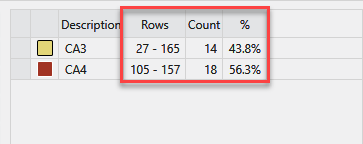
Rows |
Shows the first row and the last row with this entry. |
|
Quantity |
Shows the quantity of rows with this entry. | |
|
% |
Shows the quantity of rows in relation to the area with entries. |

