Technique (Ribbon Group)
起头 tab -> 衬经工艺 group
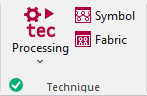
Run the following functions in the 衬经工艺 ribbon group:
|
|
Technique 开始当前花型的工艺处理。 Select the desired function in the expander under Technique:
|
|
|
图标 检查并修改处理的花型。 重新处理将会覆盖所做更改。 |
|
|
织物 通过仿真线圈视图检查处理的花型 不能对这个预览视图进行编辑。 |


 Before the 工艺处理 the
  图标 and
  织物 icons are greyed out.
After the 工艺处理 the icons appear with color. In the bottom left of the group appears the  确定 icon.
If you edit the processed symbol view after the 工艺处理, appears the  Pin icon, in the bottom left of the 衬经工艺 group.
If you edit the unprocessed symbol view after the 工艺处理, appears the  Outdated icon, in the bottom left of the 衬经工艺 group.
If any errors occur in the 工艺处理, they are displayed in the message line inside the document window.
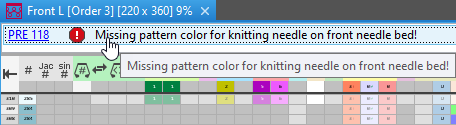
Click on the error message in order to get more information about the error cause, its position in the pattern and a possible remedy.
- The 工艺处理 will be canceled with severe errors.
The error messages are marked with a red icon.
icon. - Warnings are marked with a yellow icon.
The 工艺处理 is continued.