Properties of the module
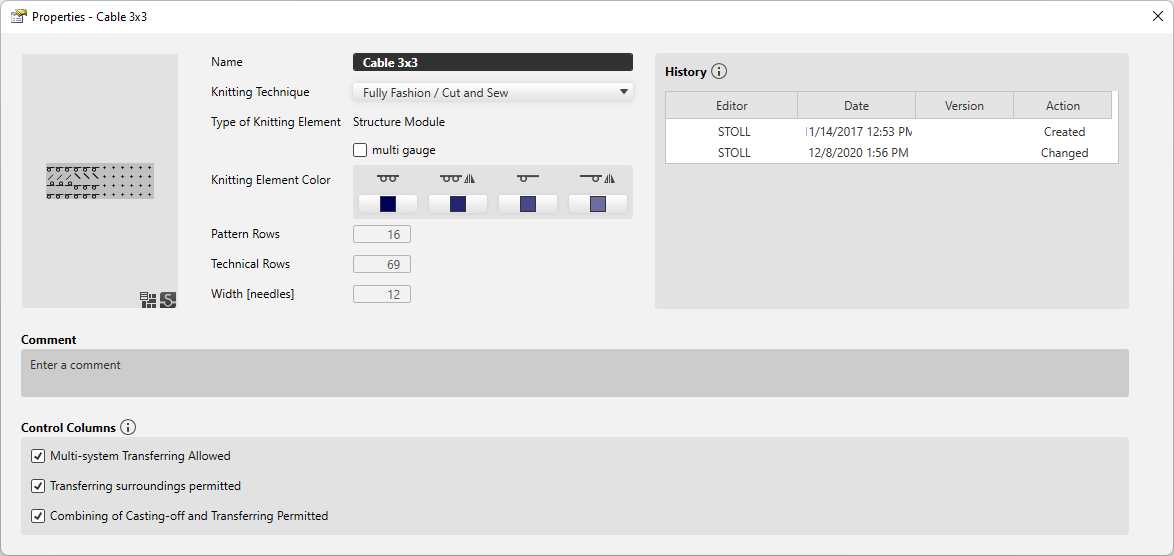
Make the following settings in the 属性 dialog box of the module:
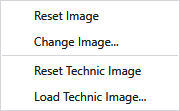
You can find the following functions in the context menu of the thumbnail:
|
重置图片 |
Resets the image to the latest status. |
|
更改图片... |
Select a new image for the thumbnail of the module. |
|
Reset Technic Image |
Resets the technical image to the latest status. |
|
Load Technic Image... |
Select a new technical image for the thumbnail of the module. |
|
名称
|
Enter the designation of the knitting element. |
|
编织工艺
|
Select knitting technique for which this knitting element can be used. |
|
编织元素类型 |
Displays the knitting element type. The knitting element type points to the use. Specific situations only allow specific knitting element types. |
|
编织元素的次类型
|
Select knitting element sub-type.
|
|
|
This knitting element is a multi gauge module. |
|
Expand Connection Modules |
Select the variant of expanding the docking module.
|
|
编织元素颜色 |
The available variants are displayed.
满针
A color can be selected for every variant. |
|
花型行 |
Height of the knitting element by 花型行. |
|
工艺行 |
Height of the knitting element by 工艺行. |
|
宽度 [针] |
Shows the width of the knitting element by needles. |


 The selection is available only for technical and Jacquard modules. Both technical as well as Jacquard modules contain various variants that are offered in the sub-types.

|
历史记录 |
历史记录项 初始创建和最近四个更改在历史记录中列出。 |
|
注释 |
Enter a comment about the knitting element. |
|
控制列 |
控制列选项 不被允许的选项将会抑制该编织元素区域范围内的控制列的相应功能。 |
|
|
1x1 transfer is allowed inside of the knitting element. |
|
|
Surroundings transfer is allowed inside of the knitting element. |
|
|
Cast off and transfer can be combined inside of the knitting element. |