Shape Properties
You make the following settings in the 模型属性 dialog box:
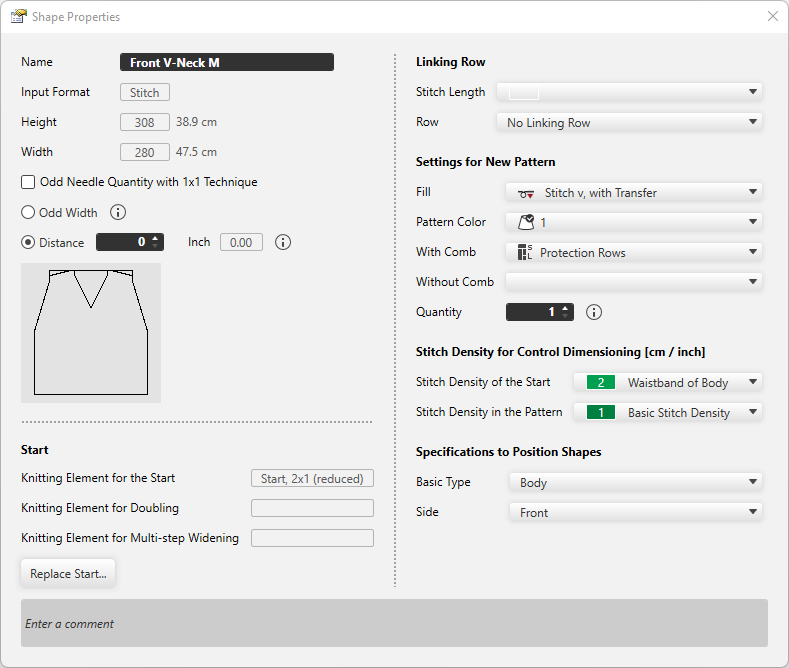
|
名称 |
Displays the name of the shape. |
|
输入格式 |
Shows the input format.
|
|
高度: |
The height of the shape appears . |
|
宽度: |
The width of the shape appears. |
|
|
With 1x1 technique the width is set to an odd needle quantity. |
|
|
增加一针使织片宽度变成奇数。 Widens a mirrored shape by one needle. This setting is only available for mirrored shapes. |
|
|
两个半织片之间的距离
|


 You can separate asymmetrical shapes as well.
起头
|
起头的编织元素 |
The knitting element for the start appears. |
|
罗纹并针编织元素 |
The knitting element for Doubling appears. |
|
多步骤放针编织元素 |
The knitting element for multi-step widening appears. |
|
更换起头 |
Opens the 更换起头 dialog box. Make the settings for the Start, Doubling and multi-step widening. |
缝合行
|
线圈长度 |
Select the stitch length for the linking row. |
|
行 |
Select row where the selected stitch length should have an effect. |

新花型设置
|
填充 |
Select fill for the new pattern. |
|
花型颜色 |
Select pattern color for the new pattern. |
|
使用牵拉梳 |
Select the knitting technique for the protection rows with comb. |
|
不使用牵拉梳 |
Select the knitting technique for the protection rows without comb. |
|
数量 |
Enter the quantity of patterns that should be knitted in the sequence. |

尺寸标注控制的线圈密度 [厘米 / 英寸]
|
起头线圈密度 |
Select the stitch density for the start. Entries of the 线圈密度 tool window are available. |
|
花型中的线圈密度 |
Select the stitch density for the pattern. Entries of the 线圈密度 tool window are available. |
定位模型的设置
|
基本类型 |
Select the basic type of the shape. |
|
侧面 |
Select the side to which the shape relates. |
|
输入注释 |
Enter a comment for the shape. |