Example 04: Alternative Excess Width
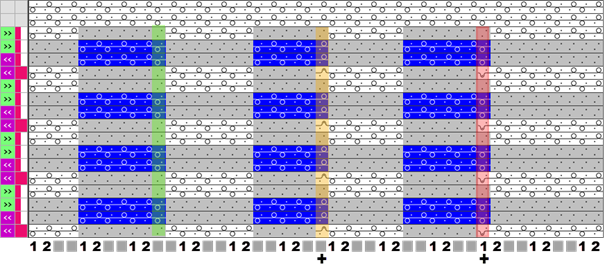
Example 1 for the application of the 'alternative excess width' in a Color Arrangement:
-
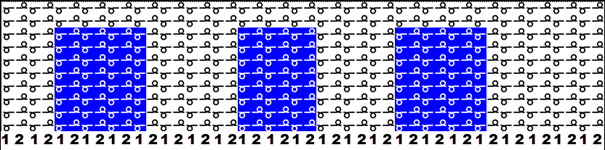
 Design Pattern with different colors and different widths of the color areas is created.
- 1
- Select the desired rows in the Row control column.
- 2
- Position the cursor in the pattern area.
- 3
- Open the context menu with RMB.
- 4
- Select Selection / Create Color Arrangement:
- The Color Arrangement Editor will be opened.
 : The original CA does not contain automatically the additional row for defining the 'Alternative Excess Width'.
 - 5
- Position the cursor in the search area and open the context menu with the RMB.
- 6
- Select Add Alternative Excess Width.
- An additional row (A) with the
 symbol is added in the search area.
 - 7
- Make the desired entries with the tools for Color Arrangement from the CA and Needle Actions / Colors tabs.
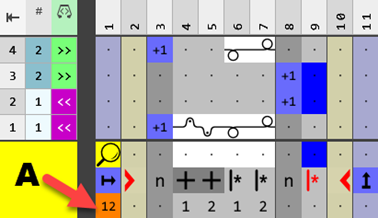
- In the
 repeating row define:
 - Define the desired repeatable cycle by
 Repeating from the left pattern column or
  Repeating from the right pattern column.
 - Define the excess width with
 Excess Width.
 - In the additional row define Alternative Excess Width:
- Allocate the numbers from the Repetitions of Rows or Alternative Excess Width selection menu to the defined cycle ( / ).: The 'empty' entry is entered as well when repeating but it has no corresponding Alternative Excess Width allocated.
- In the columns with the defined excess width allocate the numbers from the Repetitions of Rows or Alternative Excess Width selection menu as well.
- 8
- Check the generated Color Arrangement regarding its correctness with the
 Check button.
 - 9
- Apply the changes with the
 Apply button.
- or –
Close the editor with the button and confirm the prompt with the desired choice, e.g. Save button.
 - Color Arrangement is saved locally in the
 CA tool window.
 - 10
- Enter the generated Color Arrangement in the desired rows in the design pattern.
- The Color Arrangement is expanded by the technical processing.
Result:
Example 2 for the application of the 'alternative excess width' in a Color Arrangement:
- Design Pattern with different colors and different widths of the color areas is created.
- A Color Arrangement is created from the selected rows.
- 1
- Modify the Color Arrangement:
- Insert additional columns.
- In the repeating row define:
- Define the desired repeatable cycle by Repeating from the left pattern column or Repeating from the right pattern column.
- Define the excess width with Excess Width.
- Insert Alternative Excess Widthadditional row:
- Allocate the numbers from the Repetitions of Rows or Alternative Excess Width selection menu to the defined cycle ( / ).: The 'empty' entry is entered as well when repeating but it has no corresponding Alternative Excess Width allocated.
- In the columns with the defined excess width allocate the numbers from the Repetitions of Rows or Alternative Excess Width selection menu as well.
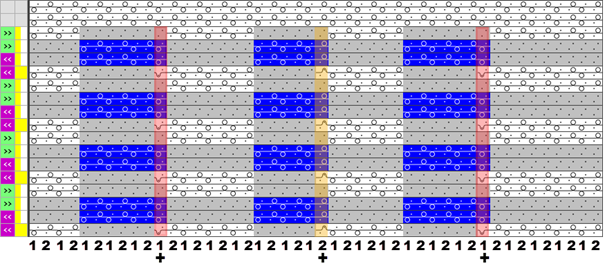
Modified Color Arrangement:
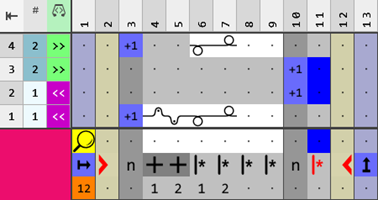
Result of Example 2 :