Technical Module: Intarsia, Border Processing Directory
-
Subdirectory for Binding:
Knitting elements for the border processing with intarsia : In the
  Repeating row the knitting elements have defined no repetitions.
 -
Subdirectory for Feeding:
Knitting elements for feeding the yarn carriers at changes of color fields: In the Repeating row the knitting elements have defined repetitions.
:
- The knitting elements of both directories have the same structure.
- The tiles of a knitting element are valid for both knitting modes
- Knitting on all needles
All Needles - Knitting by 1x1 technique
1x1-Technique
Explanation of the additional symbols within the search area and processing area
- In the search area of the attribute row
 :
: - Side:

- In the processing area:
- Searching row for needle occupancy

In order to check the needle occupancy within the pattern and to define needle groups (cycles)
Symbols of Needle Occupancy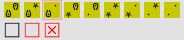
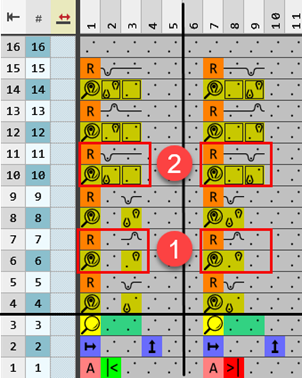
Example for binding: Front tuck, Intarsia binding
|
|
Processing Area | ||
|
1 |
Searching row for the needle occupancy of one needle in the width (cycles)
| ||
|
2 |
Searching row for the needle occupancy of two needles in the width (cycles) Marking of cycles
| ||
|
| |||
|
|
Searching row for needle occupancies | ||
|
|
|
Needle occupancy, front assigned, rear assigned | |
|
|
Needle occupancy, front not assigned, rear don't care | ||
|
|
Needle occupancy, front assigned, rear not assigned | ||
|
|
Needle occupancy, front don't care, rear assigned | ||
|
|
Needle occupancy, front not assigned, rear assigned | ||
|
|
Needle occupancy, front don't care, rear don't care | ||
|
|
Needle occupancy, front don't care, rear not assigned | ||
|
|
Needle occupancy, front not assigned, rear don't care | ||
|
|
Needle occupancy, front not assigned, rear not assigned | ||
|
|
Draw-in the desired needle action in order to override an existing pattern row.
| ||
|
Search Area | |||
|
|
|
Entry at the left edge | |
|
|
Entry at the right edge | ||
|
|
Enter any desired definition color from the Definition Colors selection menu | ||


Example feeding with intarsia binding knitting-in: Tuck, -v-, Border processing
|
| |
|
| |
|
1st step: |
Insertion of the indicated number of needles (e.g. 2) under Allowed stepping without border processing at the left
|
|
2nd step: |
Insert of fix areas |
|
3rd step: |
Insert of the repetitions from the |
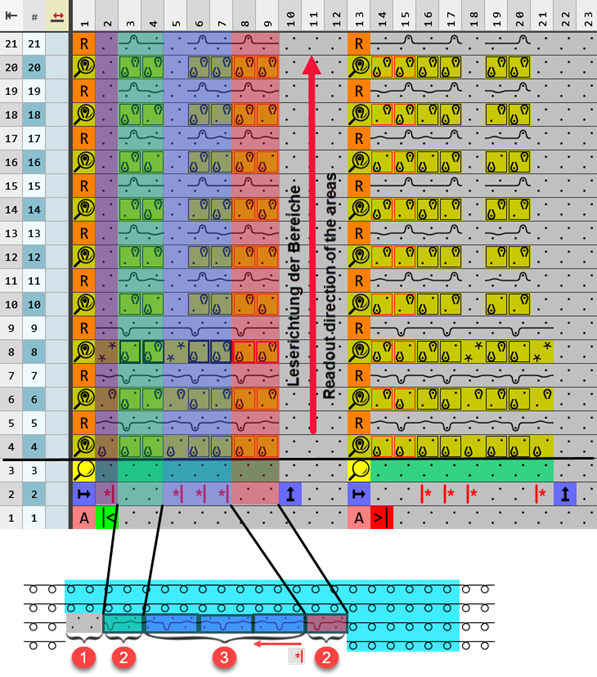
 from the
  specification.
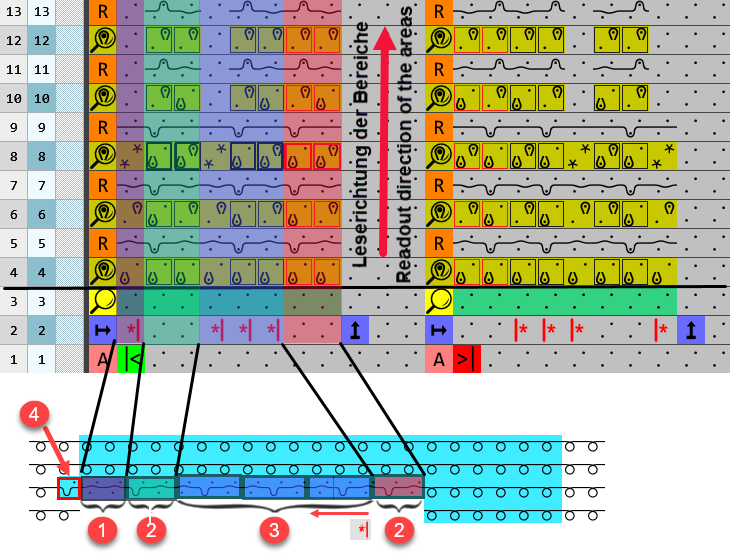
Example feeding with intarsia binding knitting-out: Tuck, -v-, Border processing
|
| |
|
| |
|
1st step: |
Insertion of the specified number of needles (e.g. 2) under Allowed stepping without border processing at the left
|
|
2nd step: |
Insert of fix areas |
|
3rd step: |
Insert of the repetitions from the |
|
4 |
Intarsia binding knitting-out at the left
|
 .
.Reading one or more columns will be stopped if the appropriate needle occupancy is found and the knitting information from the reference row  is entered in the corresponding pattern row.