Move the document window and tool window
Document windows and tool windows can be brought to the desired position in the title bar of the window through drag-and-drop. For this proceed as follows:
- Click and hold the title bar
- The following graphic appears:
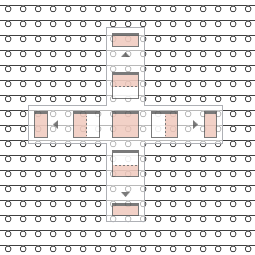
- Drag the window with pressed mouse button to the desired selection in the graphic.
 By pressing on the CTRL key during the drag-and-drop, you prevent the graphic from appearing.
The window is moved without being docked.
|
|
The window is placed inside of the area on horizontally divided space above. |
|
|
The window is placed inside of the area on vertically divided space to the right. |
|
|
The window is placed inside of the area on horizontally divided surface below. |
|
|
The window is placed inside of the area on vertically divided space to the left. |
|
|
The window is placed in the main area. |


|
|
The window is placed inside of the area on horizontally divided space above at the outermost edge. |
|
|
The window is placed inside of the area on vertically divided space to the right at the outermost edge. |
|
|
The window is placed inside of the area on horizontally divided space below at the outermost edge. |
|
|
The window is placed inside of the area on vertically divided space to the left at the outermost edge. |


At the outermost edge appear above, below, to the right and left additionally the following buttons:
|
|
The window is placed independently from the area above at the outermost edge. |
|
|
The window is placed independently from the area to the right at the outermost edge. |
|
|
The window is placed independently from the area below at the outermost edge. |
|
|
The window is placed independently from the area to the left at the outermost edge. |


