Group 5 : Border Processing
|
|
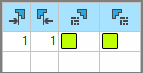
Allowed stepping without border processing at the left Enter the quantity of needles for starting the widening at the left border of the color area without automatic border processing.
|
|
|
Allowed stepping without border processing at the right Enter the quantity of needles for starting the widening at the right border of the color area without automatic border processing.
|
|
|
Module for Border Processing at the Left Select module for the border processing (feeding). With steppings greater than the setting in the Allowed stepping without border processing at the left column.
|
|
|
Module for Border Processing at the Right Select module for the border processing (feeding). With steppings greater than the settings in the Allowed stepping without border processing at the right column.
|

 No module is inserted.


