Transfer Surrounding
|
|
Make settings for surroundings transfer. |

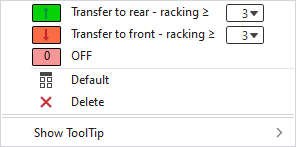
In the context menu you have the following options:
|
|
Select the racking course, after which the surroundings are transferred to the rear in the pattern. |
|
|
Select the racking course, after which the surroundings are transferred to the front in the pattern. |
|
|
Deactivates surroundings transfer. |
|
|
Sets the setting on Default.
|
|
|
Deletes the entry. |
|
Show ToolTip |


 Applies the entry of the default setting from the header row.
