Color Schemes
|
Number |
Running numbering of the colorways
| |
|
|
Delete this color combination. | |
|
Name
|
Enter a name for the color combination. . | |
|
Comment
|
Enter a comment for the color combination. | |
|
Colors |
The colors that make up the color combination are displayed. + Add a color. - Remove the selected color. | |
|
Color Setting |
Make settings for the following properties:
| |
|
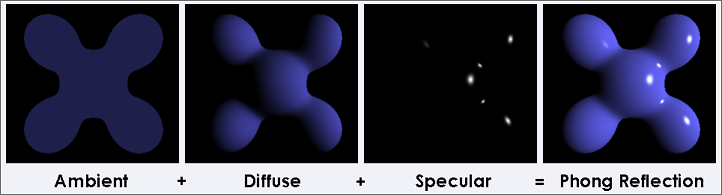
Ambient |
Define the essential coloring of the yarn. Select the color in the color field or enter the HEW color value or the RGB color values.
Factor: Determines the brightness of the color presentation. | |
|
Diffuse Reflexes |
A more realistic color representation is created from the reflection of the color. Select the color in the color field or enter the HEW color value or the RGB color values.
Factor: Determines the intensity of the reflection. | |
|
Specular Reflexes |
The mirror reflection defines the reflected color. Select the color in the color field or enter the HEW color value or the RGB color values.
Factor: Determines the intensity of the mirror reflection. | |
|
Shininess |
The shininess controls the brightness of the colored yarn. The shininess appears in the defined color of the setting Specular Reflexes. | |
 Click on the eye to display this color combination in the preview. The color combination will be removed from the preview again by clicking once more.

Using the + button on the right border you can add new color combinations.