Status bar of the MC Jacquard editor
Elements of the Status Bar:
- Displays related to cursor position
- Display settings for the document window
|
|
Shows the coordinates of the cursor position. If an area of the pattern is selected, the coordinates of the startpoint and of the endpoint, and the size of the selected area, are displayed to the left above the status bar. |
|
|
Shows the yarn color at the cursor position. |


|
|
Show Grid |
|
|
Opens the tool window Options. |


Tool Window Options
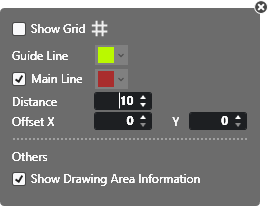
Make the following settings here:
|
|
Show or hide the grid. |
|
Guide Line |
Change the color of the help lines. |
|
|
Show or hide the main lines. Change the color of the main line. |
|
Distance |
Enter the distance of main lines. |
|
Offset |
Enter offset, which the main lines are used from. |
|
|
Display and hide the coordinates view in the documents window. |


The colors for drawing are offered in the lower area.

Select a color and draw in the MC Jacquard with the help of the drawing tools.