Context menu in the header
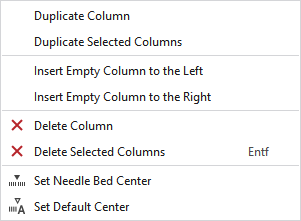
Make the following settings in the context menu of the header:
|
Duplicate Column |
Duplicated the column under the cursor. |
|
Duplicate Selected Columns |
Duplicates the selected columns. |
|
Insert Empty Column to the Left |
Adds an empty row at the left of the clicked column. |
|
Insert Empty Column to the Right |
Adds an empty row at the right of the clicked column. |
|
|
Deletes the column at the cursor position. |
|
|
Deletes all the selected columns. |
|
|
Sets the needle bed center at the column under the cursor. |
|
|
Sets the needle bed center to default. |


