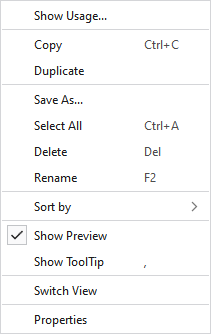
Context menu on the yarns
|
Show Usage... |
Displays the pattern colors where yarn is used in the entire pattern project. |
|
Copy |
Copies the yarn |
|
Duplicate |
Duplicates the yarn |
|
Save As... |
Saves the yarn in any folder. |
|
Select All |
Selects all yarns. |
|
Delete |
Deletes this yarn. |
|
Rename |
Rename this yarn. |
|
Sort by |
Sorts the yarns by name.
Sorts the yarns by modified date.
You can move the yarns inside of the content view as desired. This arrangement is saved as User Defined and with this call-up it is also displayed again. |
|
|
In the tooltip on the yarn appears the preview. |
|
|
In the tooltip on the yarn appears the tooltip. |
|
Switch View |
Switches the view of the yarns between tiles and list. |
|
Properties |
Opens the Properties dialog box of the yarn. |
