Border Processing for Intarsia Jacquard
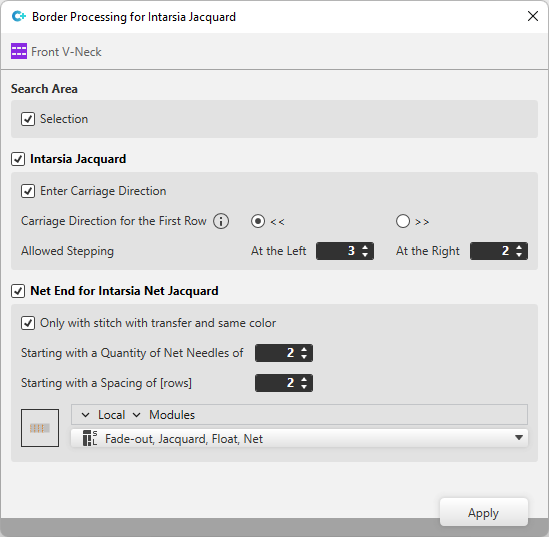
Search Area
|
|
Apply settings to the selected area only.
|

 : The settings apply to the entire pattern.
Intarsia Jacquard
|
|
The carriage direction is entered |
|
Carriage Direction for the First Row |
<< The carriage direction preset here will be used for those rows only, for which no carriage direction is set within the control column.
|
|
Allowed Stepping |
Enter the allowed stepping for left and right side. |
 / >>
/ >>  is only taken into account if
 Net-end for Intarsia Jacquard.
|
|
The Net Ending module is only inserted if the following conditions are met:
|
|
Starting with a Quantity of Net Needles of |
The Net Ending module is only inserted, if the number of the ending net needles at least correspond to the entered value. |
|
Starting with a Spacing of [rows] |
The intermediate spacing applies to the quantity of knitting rows between a net ending and a new net pick-up.
|
|
Module Selection |
Select module for the Net Ending. |
