SFOINIT
The SFOINIT tab contains the settings for the initialization of the feed wheels. The settings from the SFOINIT tab is effective as long as no SFOI entry is assigned via the control column.
Every created group receives an entry in the SFOINIT tab that can be edited specifically for the group.
If no values were entered for a group, then the values from the group 0 are effective.
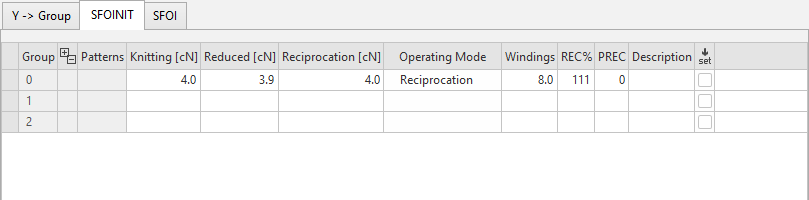
You make the following settings on the SFOINIT tab:
|
Group |
Specify a group of feed wheels with common settings. Quantity of feed wheel groups: Group 0 If no basic setting was defined for a feed wheel group, the values of the "Group 0" will be effective. Tip: If only one feed wheel group is used in a knitting program, you can work with the "Group 0". This has the advantage that you do not need to adjust anything in the "SFOI" tab. |
|
|
Show or hide pattern-related values
In the context menu of a selected row you can insert a row for pattern-related values of a specific pattern. |
|
Pattern |
Name of the pattern in case of rows with pattern-related values |
|
Working [cN] |
No yarn is taken-up in the carriage reversal. Value range: |
|
Reduced [cN] |
Normally, the reduced yarn tension is about 0.4 cN higher than the knitting or the reciprocation tension. Value range: |
|
Reciprocation [cN] |
The yarn tension is maintained constant:
Value range: |
|
Operating Mode |
Select the operating mode with its specified yarn tension.
|
|
When the machine stops (engaging rod down), the reduced yarn tension is active. Normally, the reduced yarn tension is about 0.4 cN higher than the knitting or the reciprocation tension.
| |
|
The operating mode "Reciprocation" was developed specifically for the flat knitting machine. The yarn tension is maintained constant:
In the carriage reversal, the yarn length that is not needed will be restored by the feed wheel. You can adjust the reciprocation tension in the "Mode 8 / " column. Special case: Elastic yarns (e.g. Lycra) | |
|
| |
|
Windings |
Specify the quantity of windings around the yarn wheel. Value range 1 – 40 The number of yarn windings are entered directly on the feed wheel (Mode 61). If you want to change the number of windings, enter it directly on the feed wheel (Mode 61). Then, thread-up the feed wheel again. |
|
REC% |
Specify the yarn tension return correction by % for the yarn tension during the take-up process. Only active with the "Reciprocation" operating mode. Value range: Default 111 % Increase the value with a heavy yarn to compensate the inertia of the yarn. With a fine, sensitive yarn reduce the value so that the yarn does not break when accelerating.
|
|
Adjust the yarn tension return correction:
| |
|
PREC |
Specify the permanent take-up function. The take-up function prevents yarns from sagging after a machine stop. Value range 0 - 1 0 = The feed wheel works with the specified operating mode (Working, Reduced, Reciprocation). 1 = The feed wheel always works with the "Reciprocation" operating mode. With a machine stop the feed wheel changes to the "Reduced" operating mode by default. If one is working on the machine, threads can be pulled by mistake - the yarn will be sagging. If the machine is started then, it can lead to an error. Remedy: Activate the take-up function ("1"). |
|
Adjust the take-up function:
| |
|
Description |
Note on the use of the entry. You can enter a text here. |
|
|
|


 At the feed wheel, the "
 Not available for

Further information: