Status Bar of Fabric View
Elements of the Status Bar:
- Displays related to cursor position
- Display settings for the document window
|
|
Shows the coordinates of the cursor position. If an area of the pattern is selected, the coordinates of the startpoint and of the endpoint, and the size of the selected area, are displayed to the left above the status bar. |
|
|
Shows the yarn color at the cursor position. |
|
|
Shows the needle action or module at the cursor position. |
|
|
Shows the stitch length at the front and rear of the cursor position. |





|
|
Desplegado Shows the opened view with technical rows. |
|
|
Colapsado Shows the compact view only in pattern rows. |
|
|
Representación de distorción When activating the distortion representation, the stitch distortion is automatically calculated. This is especially important with designs with stitch transfer, narrowings and Fully Fashion designs. |
|
|
Visualización con proporción de densidad de mallas If the view is activated with stitch density ratio, the design is displayed with the stitch density that was entered in the Densidad de las mallastool window. |
|
|
Resolver mallas caídas By activating the display of drop stitches, failures in the knitting design become visible. |
|
|
Mostrar pasadas de protección Display and hide comments |
|
|
Retirar el hilo de separación Display without draw thread and residual yarn |
|
|
Textura de hilo By activating the yarn texture, the yarn structures of the yarns in use become visible. Make the corresponding settings in the yarn properties. |
|
|
Segundo plano Click on the
3 ways to specify the color:
|


 button to define the background color of the fabric view.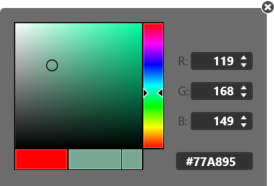
Make the following settings additionally after processing:
|
|
Visualizar en colores de los guiahilos |
