Multi-system Transferring
|
|
Make settings for Transferir con sistemas múltiples. |

In the context menu you have the following options:
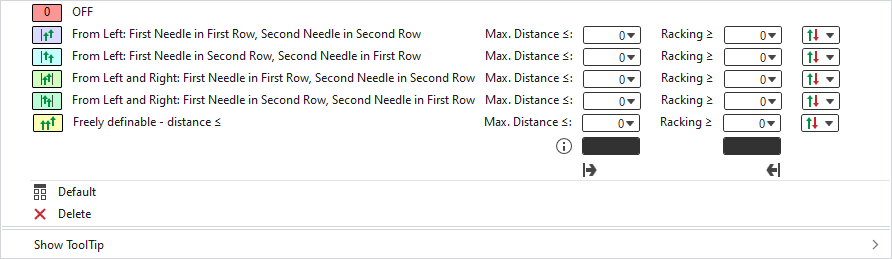
|
|
Transferir con sistemas múltiples is disabled. |
|
|
Transferir con sistemas múltiples is activated and has the following results: In every transfer area, the first needle transfers from the left in the first system and the second needle transfers in the second system. Enter distance between needles, up to which the multi-system transfer should occur. Enter racking, after which the multi-system transfer should occur. Select transfer direction, on which the multi-system transfer should have an effect. |
|
|
Transferir con sistemas múltiples is activated and has the following results: In every transfer area, the first needle transfers from the left in the second system and the second needle transfers in the first system. Enter distance between needles, up to which the multi-system transfer should occur. Enter racking, after which the multi-system transfer should occur. Select transfer direction, on which the multi-system transfer should have an effect. |
|
|
Transferir con sistemas múltiples is activated and has the following results: The first needle from left on the left fabric selvedge and the first needle from the right on the right fabric selvedge, transfer in the first system, the second needle accordingly in the second system. Enter distance between needles, up to which the multi-system transfer should occur. Enter racking, after which the multi-system transfer should occur. Select transfer direction, on which the multi-system transfer should have an effect.
|
|
|
Transferir con sistemas múltiples is activated and has the following results: The first needle from left on the left fabric selvedge and the first needle from the right on the right fabric selvedge, transfers in the second system, the second needle accordingly in the first system. Enter distance between needles, up to which the multi-system transfer should occur. Enter racking, after which the multi-system transfer should occur. Select transfer direction, on which the multi-system transfer should have an effect.
|
|
|
Transferir con sistemas múltiples is activated and has the following results: In the black text boxes you define the sequence of the transferring needles after the following scheme. Enter distance between needles, up to which the multi-system transfer should occur. Enter racking, after which the multi-system transfer should occur. Select transfer direction, on which the multi-system transfer should have an effect. |
|
|
Sets the setting on Estándar.
|
|
|
Deletes the entry. |
|
Mostrar información rápida |


 The selection is especially suitable for fully fashion knitting, to ensure the desired behavior at the fabric selvedge.



 Applies the entry of the default setting from the header row.
