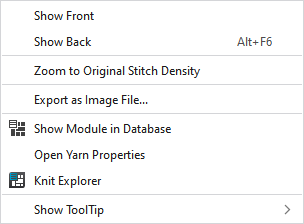
Context Menu of the Fabric View
|
Mostrar lado anterior |
View of the front side | |
|
Visualizar revés |
View of the rear side | |
|
Aplicar zoom hasta densidad de mallas original |
Sets the zoom back to the original setting. | |
|
Exportar como archivo de imagen... |
Exports the pattern as an image file. The following dialog box appears: | |
|
|
Opens the Knit Explorer and shows the clicked on module. | |
|
Abrir propiedades de hilo |
Opens the Yarn Properties dialog box of the clicked on yarn. In the Yarn Properties dialog box, you make the settings for the yarn. | |
|
|
Opens the Knit Explorer . In the Knit Explorer, in the Garne folder, you can find the generated yarn examples and you can generate new examples.
| |
|
Mostrar información rápida |
|
Activates the tooltip in the needle area. |
|
|
Activates the tooltip in the needle area, as well as a preview of the modules. | |


 Drag the yarn example by drag-and-drop from the Knit Explorer to the fabric view to get the corresponding presentation.
