Editing Area of Technical Module
Technical modules generally consist of individual tiles that are applied in different situations.
Tiles
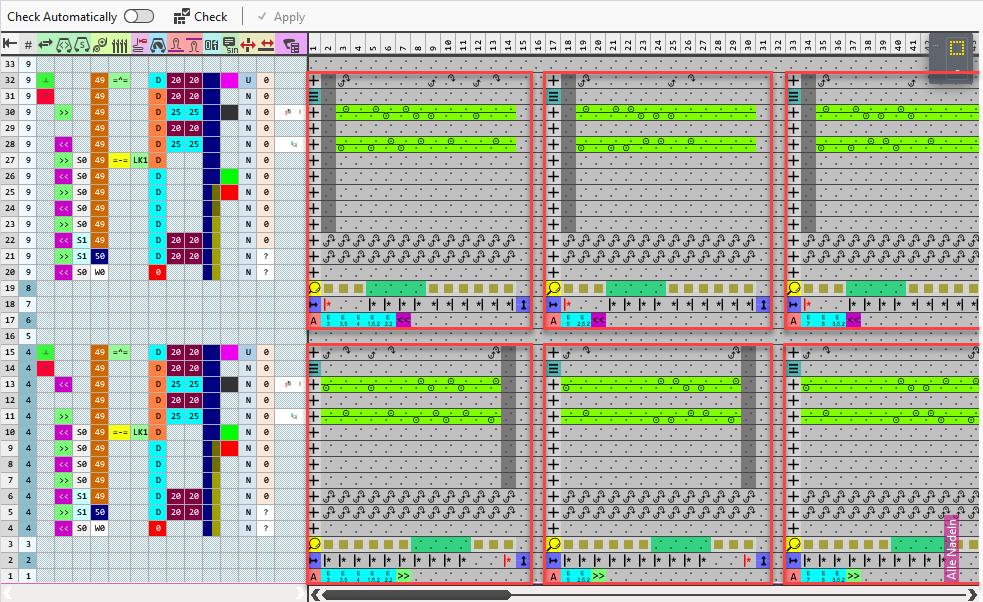
The red-framed areas of the image represent the different tiles.
Technical modules are applied in different application scopes and accordingly can be set up very differently.
However, the structure of the tiles is uniform.
The structure of the tiles
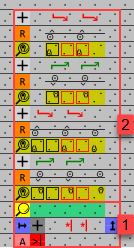
A tile consists of a search area and a processing area.
|
1 |
Search Area The search area consists of three rows.
In the search row you can find the search attributes.
Allowed symbols in this row:
In the repeating row it is defined how the processing area is used in the width. Allowed symbols in this row:
The attribute row contains the symbols that define under which conditions this tile is applied. Allowed symbols in this row: |
|
2 |
Processing Area The processing area contains the knitting sequences that are to be applied. In some cases, different knitting cycles have to be considered for different situations of the needle occupancy. |

 Defining colors are used in the search row that are replaced by the current colors of the pattern when applying the module.


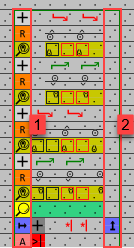
The first left column of a tile is the function column and the last right column is the end column.
|
1 |
Function Column The functions column contains the symbols that state which function the row in the module carries out. The functions column can contain the following symbols for executing rows and control rows: |
|
2 |
End Column The end column marks the right edge of the tile with the |
 symbol and can contain the symbol for the repeating of rows
  in the processing area.