Start with Start, Repeating and Final Area
Start with Start, Repeating and Final Area
With conventional start module, is it not possible to set the occupancy of the last needle of the start as the module is cut according to the pattern width.
- Example:
With an even numbered pattern width and a 1x1 start, the left border starts by a jersey stitch and the right border ends by a reverse stitch.
With modules with start, repeating and final areas, you can get a jersey stitch at the left and right of the pattern.
Module Structure
-
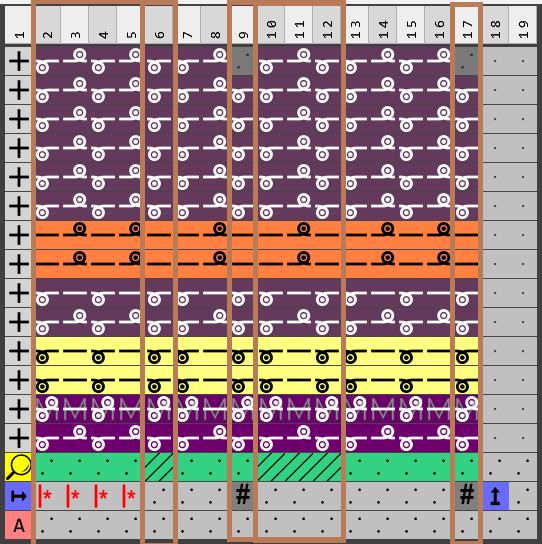
- As known from technical modules, the starts can contain the following rows:
 Pasada de búsqueda
  Pasada de repetición
  Pasada de atributos
 - The attribute row is displayed to keep it similar to technical modules despite it has no meaning and is kept empty.
- The module is divided in to the following areas (see picture):
Repetition (columns 2 – 5)
Final areas of different widths (column 6, 7+8, 10 – 12 and 13 – 16)
Excess width at Shape Edge (column 9 and 17). - The start area (not shown in picture) would be at the left of the repetition area.
Neighboring end areas are separated by hatching .
.
Excess width is required if the width of the end area is a multiple of the width cycle of the start.
Usage within the pattern
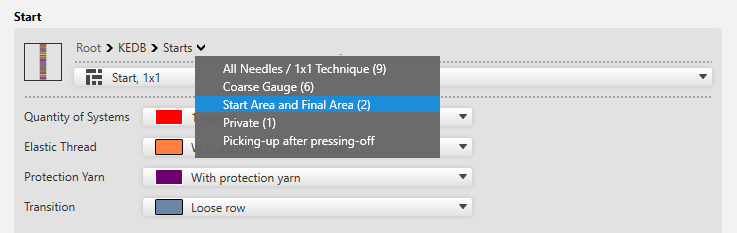
- You will find examples of starts in the new Comienzos / Sector de inicio e de final directory of the Knit Explorer.
-
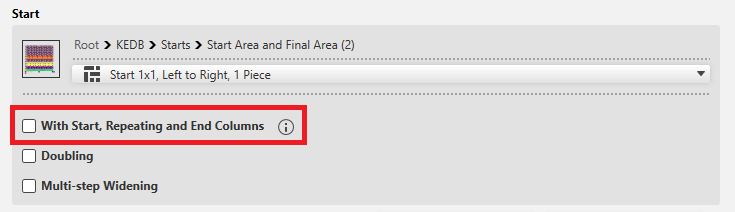
- If you select a start with the new areas, you have to set whether they should be considered when inserted into the pattern:
Activate con columnas de inicio, repetición y fin.
 -