Context menu of the pattern layer
Make the following settings in the context menu of the pattern layer:
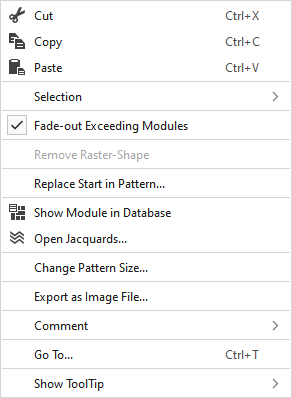
|
|
Elimina el contenido de la selección y lo copia al portapapeles. | |
|
|
Copia el contenido de la selección al portapapeles. | |
|
|
Llevar el contenido del portapapeles al cursor (atributos del cursor). | |
|
Selección |
Crear Jacquard... |
I. Generate a Jacquard area in the selected area. |
|
|
Create a pattern element from the selection. Desde la selección existente genera una nueva parte de muestra y la agrega a la ventana de herramientas 'Partes de muestra'. | |
|
Select |
The functions of the menu bar Selección are also available in the context menu. | |
|
Proteger |
A selection can be protected from interventions. | |
|
|
Ocultar módulos de la muestra básica, que son cortados por la anchura de ocultación de una línea de corte o de una marca. | |
|
Quitar forma rasterizada |
If a .spf pattern with raster-shape is imported, this function can be used to remove the raster-shape from the pattern.
| |
|
Reemplazar comienzo en la muestra... |
Llamar el diálogo Reemplazar comienzo para seleccionar el comienzo deseado. | |
|
|
Shows the module at the cursor position in the database. | |
|
|
Opens the tool window Jacquards and shows in it the Jacquard of the cursor position. | |
|
Modificar tamaño de muestra... |
Opens the dialog box where you can change the height and width of the pattern. | |
|
Exportar como archivo de imagen... |
Save the design view off the whole pattern as image file. | |
|
Comentario |
Place a pin, comment, or graphic anywhere in the pattern. | |
|
Ir a... |
Opens the Ir a dialog box. | |
|
Mostrar información rápida |
Make settings for the tooltip. | |


 You cannot edit a raster-shape in
