New Design Pattern (dialog box)
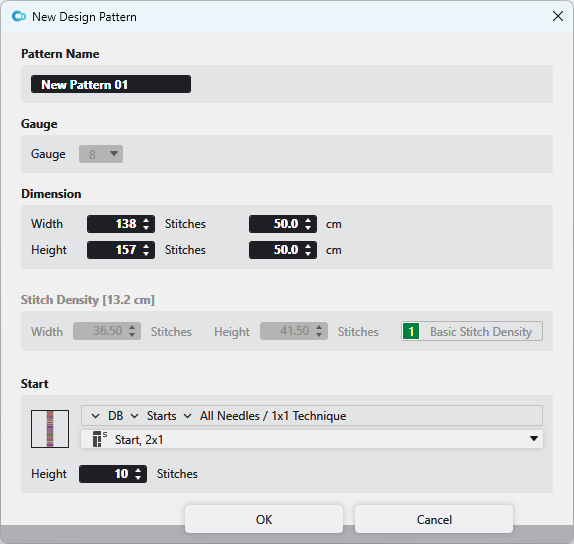
You make the following settings in the Nueva muestra de diseño dialog box:
|
Nombre |
Enter the name of the design pattern. | |
|
Galga |
Select the gauge of the design pattern. | |
|
Dimensión |
Enter Anchura: The dimension is shown and entered by Mallas and by cm or Pulgadas angezeigt und eingegeben.
| |
|
Densidad de las mallas |
Shows the current stitch density in Anchura: The values are extracted from the entry 1, Densidad de las mallas básica from the Densidad de las mallas tool window. The values can be edited.
| |
|
Comienzo |
Select a start from the database. | |
|
|
Opens the Knit Explorer. Select the module for the start. | |
|
|
Select the path from the Knit Explorer. directly. Click on the arrow | |
|
|
Select module for the start. | |
|
Altura
|
Indicate the height | |
 and
and  The measure unit
  and
and 


