Pattern Properties
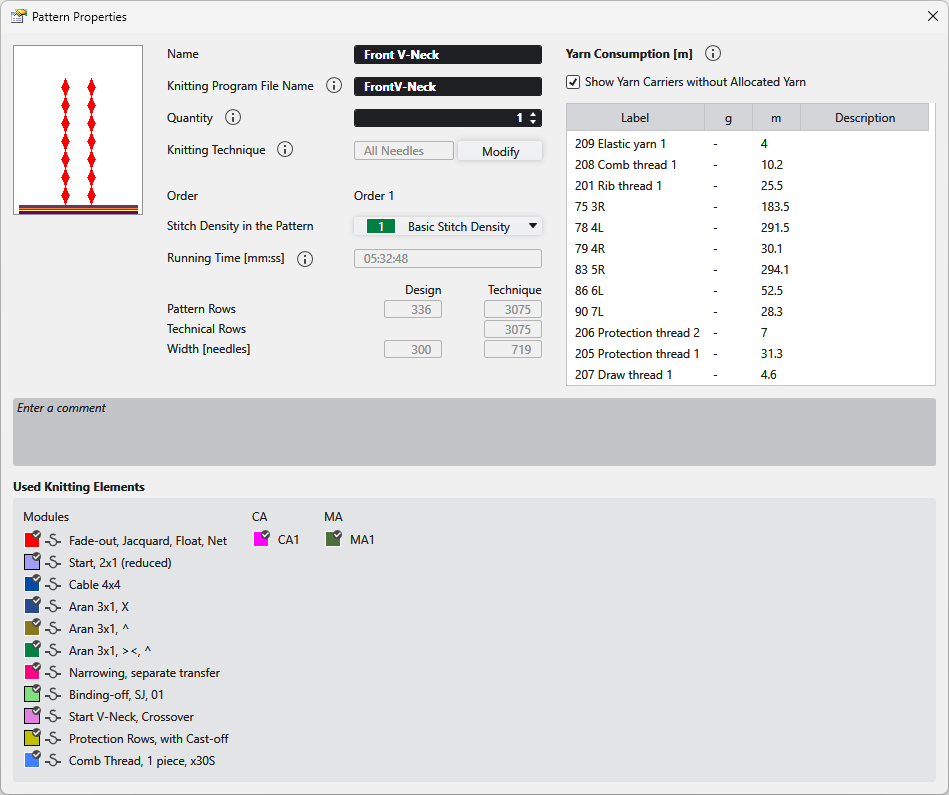
In the Propiedades de la muestra dialog box you get the information on the pattern and can make the following settings.
|
Nombre |
View and edit the name of the pattern. |
|
Nombre de archivo de programa de tisaje |
Enter the name for the knitting program to be created.
|
|
Cantidad |
Enter the quantity of fabric pieces that should be knitted from this pattern in the corresponding order (sequence). |
|
Técnica de tisaje |
Displays the knitting technique (all needles or 1x1 technique).
|
|
Modificar |
Changes the knitting technique between Todas las agujas and Técnica 1x1 . |
|
Pedido |
Displays the name of the order. |
|
Densidad de las mallas en la muestra |
Displays the entered stitch density of the pattern. Select an entry from the Densidad de las mallas tool window. |
|
Tiempo de tisaje [hh:mm:ss] |
Shows the running time in minutes and seconds.
|
|
Pasadas de muestra |
Displays the pattern rows in the design pattern and after processing. |
|
Pasadas técnicas |
Shows the technical rows. |
|
Anchura [agujas] |
Displays the width in the design pattern and after processing. |
|
Consumo de hilo |
Muestra el consumo de hilo para todos los hilos en el programa de tisaje. Los valores recién están disponibles después del control Sintral. La longitud de hilo [m] se puede diferenciar de la visualización en el control Sintral, ya que el control Sintral solo visualiza la longitud de hilo simple de los guiahilos individuales. Para los hilos que están definidos y asignados en las ventanas de herramientas 'Definición de hilos' y 'Asignación de hilos', también se visualiza el consumo de hilo en gramos [g].
The specification of the yarn length and the weight relates to the entries in this tool window: Example: |
|
|
Also displays yarn carriers that were not assigned in the Asignación de hilo tool window. |
|
Denominación |
Displays the designation of the yarn from the Asignación de hilo. |
|
g |
Displays the weight of the yarn consumption is gram [g]. |
|
m |
Displays the length of the yarn consumption in meter [m]. |
|
Descripción |
Shows the description of the Definición del hilo. |
|
Entrar comentario |
Enter a comment to the pattern. |
|
Elementos de tisaje utilizados |
Shows the modules, CAs and MAs in use by the pattern. These knitting elements can be opened with a double-click. |