New MC Jacquard (dialog box)
The  Nuevo MC Jacquard dialog box can be called up as follows:
In the Start window:
In the tab Archivo :
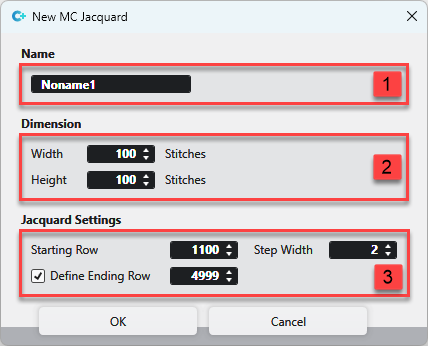
|
1 |
Nombre Enter name of the new MC Jacquard. | |
|
2 |
Dimensión Enter width | |
|
3 |
Ajustes Jacquard | |
|
Pasada inicial |
Specify the starting row of the line numbering for the MC Jacquard. | |
|
Anchura de pasos |
Specify the step width of the line numbering for the MC Jacquard. | |
|
|
Determine if you enter an ending row for the line numbering of the MC Jacquard and enter the value. | |
 and height
After confirming the entries in the dialog box, the MC Jacquard is opened.