Shape Properties
You make the following settings in the Propiedades de corte dialog box:
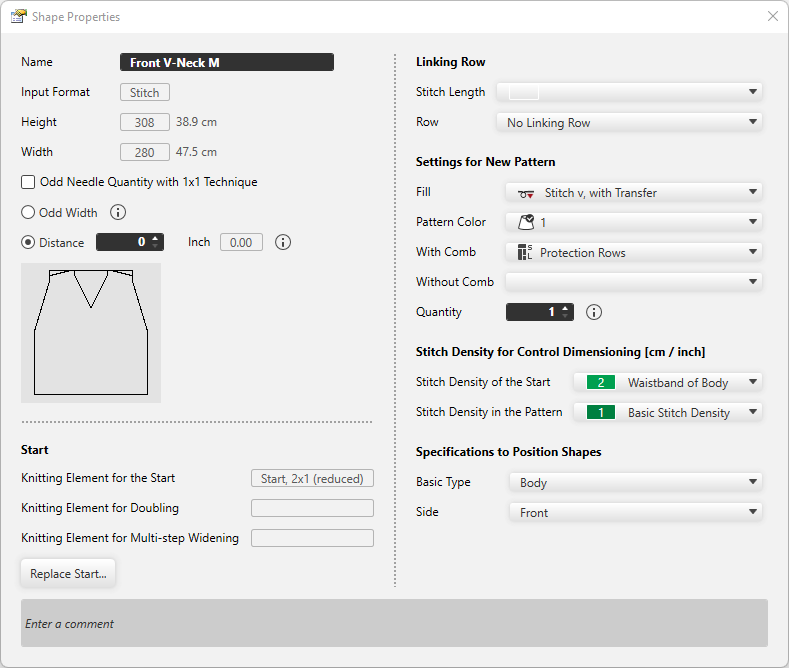
|
Nombre |
Displays the name of the shape. |
|
Formato de entrada |
Shows the input format. (Stitch, steps or hand knitting (courses) ) |
|
Altura: |
The height of the shape appears |
|
Anchura: |
The width of the shape appears. |
|
|
With 1x1 technique the width is set to an odd needle quantity. |
|
|
Widens the distance of shape halves by one needle to get an odd width of the fabric piece. |
|
|
Enter the distance in needles between the shape halves. |


Comienzo
|
Elemento de tisaje para el comienzo |
The knitting element for the start appears. |
|
Elemento de tisaje para Doubling |
The knitting element for Doubling appears. |
|
Elemento de tisaje para aumento en varios pasos |
The knitting element for multi-step widening appears. |
|
Reemplazar comienzo |
Make the settings for the Start, Doubling and multi-step widening. |
Pasada de remallado
|
Longitud de malla |
Select the stitch length for the linking row. |
|
Pasada |
Select row where the selected stitch length should have an effect. |

Predefiniciones para Nueva muestra
|
Relleno |
Select fill for the new pattern. (needle action or knitting element) |
|
Color de muestra |
Select pattern color for the new pattern. |
|
Con peine |
Select the knitting technique for the protection rows with comb. |
|
Sin peine |
Select the knitting technique for the protection rows without comb. |
|
Cantidad |
Enter the quantity of patterns that should be knitted in the sequence. |

Densidad de mallas para el dimensionamiento de control (cm / pulgadas)
|
Densidad de las mallas en el comienzo |
Select the stitch density for the start. The entries of the Densidad de las mallas tool window are available. |
|
Densidad de las mallas en la muestra |
Select the stitch density for the pattern. The entries of the Densidad de las mallas tool window are available. |
Especificaciones para el posicionamiento de corte
|
Tipo básico |
Select the basic type of the shape. |
|
Lado |
Select the page to which the shape relates. |
|
Entrar comentario |
Enter a comment for the shape. |