Color Arrangement Editor
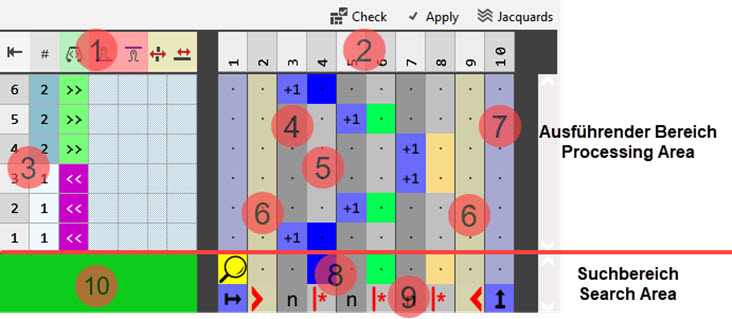
Designation of the rows and columns in the Color Arrangement Editor (CA)
|
| |||||
|
1 |
Control Columns
|
| |||
|
2 |
Column bar with numbering
| ||||
|
3 |
Row bar with numbering
| ||||
|
Processing Area |
Search Area | ||||
|
4 |
Reference column with reference numbers
|
8 |
Search row | ||
|
5 |
Color column in the color segment |
9 |
| ||
|
6 |
Shape column
|
10 |
Color of the color entry in the | ||
|
7 |
Column for defining a repeating of rows |
| |||
|
| |||||
|
Check: |
|
Automatique |
The created knitting element are not automatically checked regarding the correct structure. | ||
|
|
Automatique |
The created knitting element are automatically checked regarding the correct structure. | |||
|
|
Manuellement |
Checking of the Color Arrangement regarding the correct use of tools in the editor | |||
|
|
Apply changes without closing the editor | ||||
|
|
Opening of the Jacquard dialog box to display the Jacquards inserted in the design pattern | ||||
 : All control columns are available
 with the search colors
 control column


 Apply
Apply Jacquard