Quick Access Toolbar
In the quick access toolbar you have access at any time to the following commands:
 The quick access toolbar can be found at the left border of the title bar.

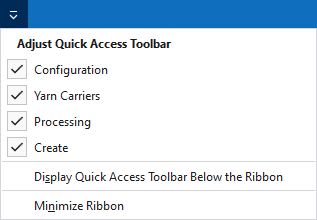
Using the drop-down menu you can display and hide some commands in the quick access toolbar.
Make settings for the presentation of the ribbon.
The following commands are always active in the quick access toolbar and cannot be hidden:
|
|
Créer un nouveau projet de dessin (*.spf). |
|
|
Ouvrir un fichier (dessin, élément de tricotage, coupe). |
|
|
Enregistrer |
|
|
Annuler l'opération précédente. |
|
|
Répère l'opération précédente. |
|
|
Organiser les éléments de tricotage, donc les modules, CA et parties de dessin dans le Knit Explorer. |


Personnaliser la barre d'outils Accès rapide
The following commands can be displayed and hidden in the quick access toolbar:
|
|
Affiche la boîte de dialogue Configuration. |
|
|
Ouvre la vue Guide-fils de tous les dessins de l'ordre actuel (séquence). Ici, vous pouvez voir et modifier l'occupation des guide-fils et les paramètres de couleurs. |
|
|
Lancer l'élaboration technique du dessin actif. |
|
|
Crée le programme de tricotage (SIN, JAC, SET) du dessin actif après l'élaboration technique. |


Make settings for the quick access toolbar and the ribbon:
|
Afficher la barre d'outils Accès rapide en-dessous du ruban |
Display the quick access toolbar under or above the ribbon. |
|
Réduire le ruban du menu |
Show or hide the ribbon. |