Modify Markings for Multi-step Widening and Multi-step Narrowing
Modify the markings for multi-step widening and multi-step narrowing:
- Shape is created as lined shape.
- Shape line with Multi-step Widening or Diminution à plusieurs niveaux allocated underFonction is available.
- 1
- Select the shape line with the Multi-step Widening or Diminution à plusieurs niveaux function in the
 New Shape xx [Size M] document window.
 - 2
- Open the context menu.
- 3
- Select
 Propriétés des lignes :.
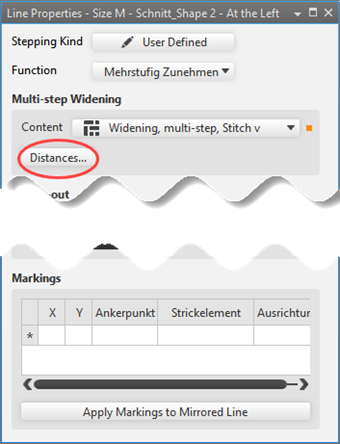
 - The Propriétés des lignes tool window is opened.
- 4
- Press the Distances... button in the Augmentation à escaliers / Diminution à plusieurs niveaux tab.
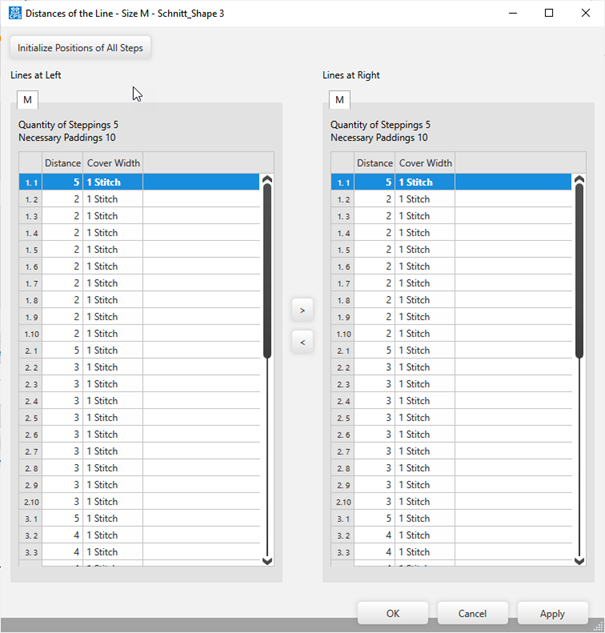
- The Distances de la ligne dialog box appears showing each step (Nombre d'escaliers) with the set step width (Distances nécessaires).
- 5
- Change the symmetric / asymmetric values of the table.
- 6
- Confirm changes by Accepter.
- or -
Close the dialog box with OK.
- The positions of the symbols for Multi-step Widening appear in the shape.
 : You cannot position the symbols for Multi-step Widening or Diminution à plusieurs escaliers manually.