Example 3 : Create Color Arrangements Using Different Weft Yarn Carriers
Color Arrangement 1+2: Create half milano with weft yarn and weft yarn presser foot to use a Qw weft yarn carrier:
- Design Pattern is created.
- 1
- Select the desired rows in the Rangée control column.
- 2
- Position the cursor in the pattern area.
- 3
- Call up the Sélection
/ Créer un Color Arrangement...
context menu.
- or -
Click directly the button in the ribbon.
 - The Color Arrangement Editor will be opened.
- 4
- Create a plating color in the
 Couleurs de vanisage tool window for the weft yarn (A) and following knitting (B).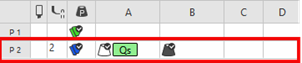
- 5
- Allocate Qs or Qw to the yarn color in column (A) via the context menu Fil de trame.
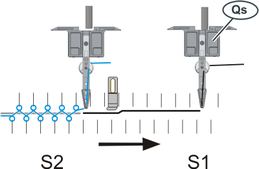
- Weft yarn carrier type Qs will be driven by the system.
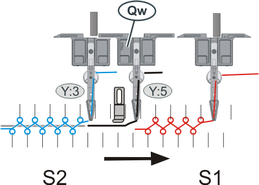
- Weft yarn carrier type Qw (special yarn carrier) will be running ahead of the system.
- 6
- Allocate the desired type of presser foot in the context menu of the
 Presse W column.
 - 7
- Make the desired entries in the editor with the tools for Color Arrangements from the CA and Actions d'aiguilles / couleurs tabs.
- 8
- Therefore, insert one row above each pattern row into the executing area of the Color Arrangement:
- 9
- Draw needle action
 Maille avant - Maille arrière. with the plating color P2 into both of the reference rows.
 - 10
- Enter the following information into the inserted rows:
- Draw in the
 Maille arrière needle action with any desired yarn color, e.g. yarn color #10.
 - Define the row as additional rows by
 Conserver le numéro de rangées de référence
- 11
- Make entries to the following control columns:
-
 Système:
 - specify the desired system allocation (not mandatory)
-
 Correction de presse :
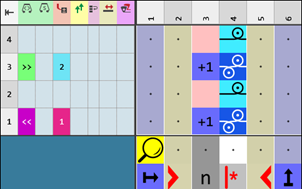
 - Set a different ESCI index for each of both the carriage directions in those technical rows in which the weft yarn presser foot is active.
|
CA1 with weft yarn carrier Qs |
CA2 with weft yarn carrier Qw |
|
|
|
|
|
|
|
|
|

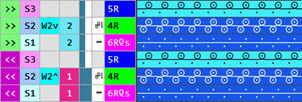
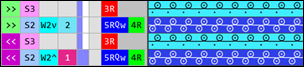
- 12
- Check the generated Color Arrangement on correct entries with the
 Manuellement button.
 : The knitting procedure cannot be checked!
 - 13
- If necessary, in case of a Color Arrangement already used in the design pattern, apply the changes to the basic pattern with the
 Accepter button.
- or -
Close the tool window with button.
 - 14
- Close the prompt with the desired button:
-
Enregistrer:
Color Arrangement is saved locally in the CA tool window.
 -
Rejeter:
The changes will not be saved. -
Copier:
The changed Color Arrangement is saved as copy in the CA tool window.
- 15
- Enter the generated Color Arrangement via the
 control column into the desired rows of the design pattern.
- The Color Arrangement is expanded by the technical processing.
Color Arrangement 3: Create half milano with weft yarn and weft yarn presser foot to use a Qs and Qw weft yarn carrier:
- Design Pattern is created.
- 1
- Select the desired rows in the Rangée control column.
- 2
- Position the cursor in the pattern area.
- 3
- Call up the Sélection
/ Créer un Color Arrangement...
context menu.
- or -
Click directly the button in the ribbon. - The Color Arrangement Editor will be opened.
- 4
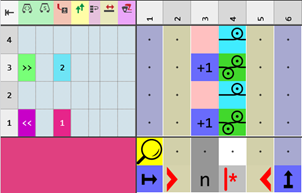
- Create a plating color in the Couleurs de vanisage tool window.
- For the weft yarn Qs (A)
- For the weft yarn Qw (B)
- For knitting (C)

- 5
- Allocate type Qs to the yarn color in column (A) via the context menu Fil de trame.
- 6
- Allocate type Qw to the yarn color in column (B) via the context menu Fil de trame.
- 7
- Allocate the desired type of presser foot in the context menu of the Presse W column.
- 8
- Make the desired entries in the editor with the tools for Color Arrangements from the CA and Actions d'aiguilles / couleurs tabs.
- 9
- Therefore, insert one row above each pattern row into the executing area of the Color Arrangement:
- 10
- Draw needle action Maille avant - Maille arrière. with the plating color P2 into both of the reference rows.
- 11
- Enter the following information into the inserted rows:
- Draw in the Maille arrière needle action with any desired yarn color, e.g. yarn color #10.
- Define the row as additional rows by Conserver le numéro de rangées de référence
- 12
- Make entries to the following control columns:
-
Système:
- Specify the desired system allocation.
(not mandatory) -
Correction de presse :
- Set a different ESCI index for each of both the carriage directions in those technical rows in which the weft yarn presser foot is active.
|
CA3 with weft yarn carrier Qs and Qw |
|
|
|
|
|
|
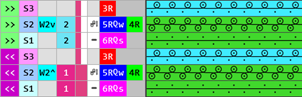
- 13
- Check the generated Color Arrangement on correct entries with the Manuellement button.: The knitting procedure cannot be checked!
- 14
- If necessary, in case of a Color Arrangement already used in the design pattern, apply the changes to the basic pattern with the Accepter button.
- or -
Close the tool window with button. - 15
- Close the prompt with the desired button:
-
Enregistrer :
Color Arrangement is saved locally in the CA tool window. -
Rejeter :
The changes will not be saved. -
Copier :
The changed Color Arrangement is saved as copy in the CA tool window.
- 16
- Enter the generated Color Arrangement via the control column into the desired rows of the design pattern.
- The Color Arrangement is expanded by the technical processing.