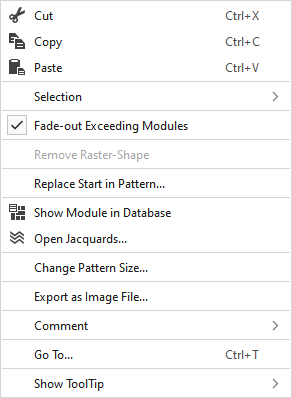
Context menu of the pattern layer
Make the following settings in the context menu of the pattern layer:
|
|
Supprime le contenu de la sélection et le copie dans le presse-papiers. | |
|
|
Insère le contenu de la sélection dans le presse-papiers. | |
|
|
Prend le contenu du presse-papiers sur le curseur (attributs du curseur). | |
|
Sélection |
Créer un MC jacquard... |
I. Generate a Jacquard area in the selected area. |
|
|
Create a pattern element from the selection. Crée une nouvelle partie de dessin à partir de la sélection en cours et l'ajoute à la fenêtre d'outils "Éléments du dessin". | |
|
Select |
The functions of the menu bar Sélection are also available in the context menu. | |
|
Protéger |
A selection can be protected from interventions. | |
|
|
Masquer les modules du dessin de base coupés par la largeur masquage de la ligne de coupe ou par un marquage. | |
|
Supprimer la forme de quadrillage |
If a .spf pattern with raster-shape is imported, this function can be used to remove the raster-shape from the pattern.
| |
|
Remplacer le début dans le dessin... |
Appeler la boîte de dialogue Remplacer le début pour sélectionner le début souhaité. | |
|
|
Shows the module at the cursor position in the database. | |
|
|
Opens the tool window Jacquards and shows in it the Jacquard of the cursor position. | |
|
Modifier la taille du dessin... |
Opens the dialog box where you can change the height and width of the pattern. | |
|
Exporter comme fichier image... |
Save the design view off the whole pattern as image file. | |
|
Commentaire |
Place a pin, comment, or graphic anywhere in the pattern. | |
|
Aller à... |
Opens the Aller à dialog box. | |
|
Afficher l'info-bulle |
Make settings for the tooltip. | |


 You cannot edit a raster-shape in
