Multiple Processing (group)
Accueil tab -> Élaboration multiple group
You can open the Multiple Processing dialog box in the Élaboration multiple group.
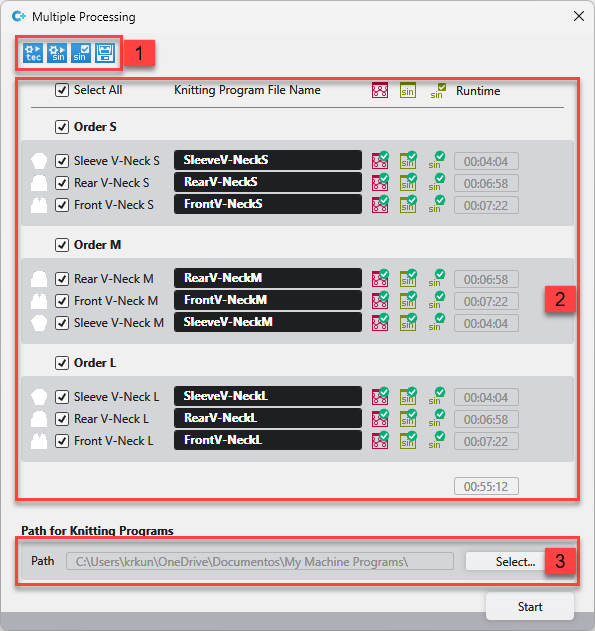
All patterns of the project appear in the Multiple Processing dialog box.
- The selected processing steps are carried out one after the other for all selected patterns.
- If an error occurs in a processing step, the processing of this pattern will be aborted with an error message. The multiple processing continues for all the other patterns.
- You can cancel the multiple processing at any time. Nevertheless, the current step of processing will finish.
- The presentation in groups, orders or only in patterns, is applied from the Pattern tool window.
|
1 |
Select the steps of processing. You can click only the patterns which are ready for this selection. All other items are greyed out. | |
|
|
Élaboration technique | |
|
|
Créer le programme de tricotage | |
|
|
Contrôle Sintral | |
|
|
Extraire le programme de tricotage | |
|
2 |
Select the patterns to be processed.
| |
|
3 |
Enter the path where the knitting programs shall be saved. | |


