Arrange Objects
Aligner les objets Ribbon Group
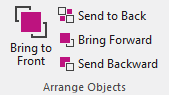
Make the following settings in Aligner les objets group:
|
|
Brings the selected object to the foreground. |
|
|
Sends the selected object to the background. |
|
|
Brings the selected object one layer forward. |
|
|
Sends the selected object one layer to the back. |


The commands affect objects of the same kind only.
- Overlapping knitting ranges
- Knitting ranges are placed directly upon the basic element
- Fading-out of the basic element always covers the knitting range
- The fix order of shape elements from bottom to top:
-
 Intérieur de la forme
 -
 Gousset
 -
 Pince
Pince -
 Trou
Trou - You can arrange the shape elements of the same type.