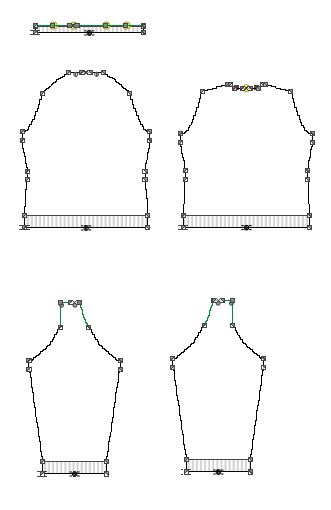
Create a New Dimensioned Shape
- The measure unit cm is set.
- The reference unit for the stitch density is 10.0 cm.
How to Define the Options for New Shapes
- 1
- On the Start page under the New Dimensioned Shape section in the left detail column select the basic shape type
 Saddle Shoulder.
 - The possible settings for the selected shape type appear in the middle detail column.
- 2
- Select the Crew Neck option in the Neckline and Opening
 list box.
 - 3
- Select the Center of Back option in the Seam Position of Collar list box.
- 4
- Select the Shaped Waist option in the Waist list box.
- 5
- Select the Inner Sleeve Length option in the Dimensioning of the Sleeve Length list box.
- 6
- Enter the value 15 in the edit box for the Width
 under Stitch Density [10 cm] in the Pattern group box of the right detail column.
 - 7
- Enter the value 20 in the edit box for the Height by Rows .
- 8
- Select the Stitch v, with Transfer needle action in the Filling Element list box.
- 9
- Do not make any settings in the Waistband of Body group box.
- 10
- Do not make any settings in the Cuff of Sleeve group box.
- 11
- Do not make any settings in the Collar and Trimming group box .
- 12
- Click the Create Dimensioned Shape button.
- The dimensioned shape appears in the Dimensioning View.