How to Check and Edit the Printout in Advance
The print preview shows the printout in advance:
- With header and footer as defined in the Basic Page Layout
 Basic Page Layout (dialog box)
 - With the input of the Information tab according to the provided placeholders Information
How to Change the Printout of Individual Sizes of the Shape File:
- Print only XS, S, M, L, XL of the XS sizes
- Do not print the Do Not Wash hint in size XS
- 1
- Select the XS size in the Dimensioning View.
- 2
- Open the Print dialog box of the Backstage View.

- The Print Preview appears with the settings of the Basic Page Layout dialog box.
- 3
- Move the cursor to
 grasper of the Do Not Wash text box.
 - 4
- Open the context menu of the grasper and click .
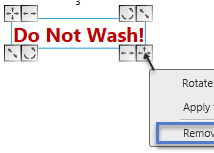
- The Do Not Wash text box is hidden and will not be printed.