Formula Editor
You call up the Formula Editor in the context menu of the Formula Table with the or the menu.
The elements in the Formula Editor:
-
No.
Consecutive ID of the formula of the table -
Label
Unauthorized characters: + - * / % & ( ) [ ] = { } !
-
Calculation
Edit box for the formula - Dimensions and other formulas
- Mathematical Functions
- Numbers and measure units
- Picklist for dimensions and formulas with button

- Virtual keyboard
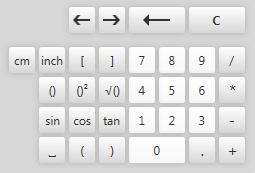
Entry via the keyboard and copy and paste is possible
-
OK
Save entries and close the Formula Editor -
Cancel
Close the Formula Editor without saving.
Examples for formulas
- Armhole with raglan
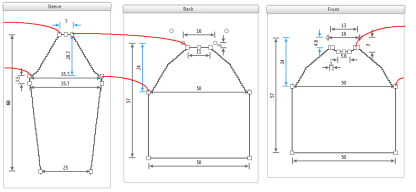
- 24 = Armhole Drop of the Body = [Armhole Drop]+[Shoulder Drop]
Simple addition of two direct dimensions
[21]+[3] = 24 - 4,6 = Calculated Shoulder Drop = [Width at End of Sleeve]*0.65]
Simple multiplication with a fixed factor (0,65)
4,6 = [7]*0.65] - 20,7 = Armhole Drop of the Sleeve = (([Armhole Drop of the Body]-[Neck Drop at the Back])+([Armhole Drop of the Body]-[Calculated Shoulder Drop]))/2
Mean value from multiple dependent dimensions
(([24]+[3]-[2])+([24]+[3]-[ [Width at End of Sleeve]*0.65]))/2
(([24]+[3]-[2])+([24]+[3]-[ [7]*0.65]))/2 - Direct dimensions without dimensioning in the single shapes
Armhole Drop = 21
Shoulder Drop = 3
Neck Drop at the Back = 2 - Direct dimensions with dimensioning in the single shape
Width at End of Sleeve = 7
Examples for formulas (Pythagorean theorem)
Inner sleeve length with dependence on the Sleeve Length and Sleeve Widths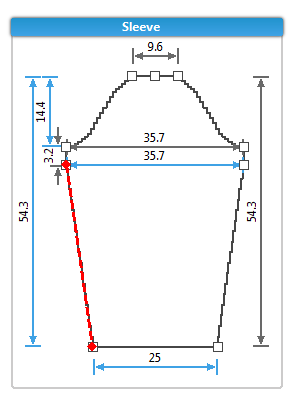
- Square root of the sum of the squares of the vertical and horizontal measures
- Sqrt(Pow([Calculated Sleeve Length]-[Calculated Armhole Drop of the Sleeve] ,2)+Pow(([Calculated Upper Sleeve Width]-[Calculated Sleeve Width at the Cuff])/2,2))
- Square Root((Power((54,3-14,4);2)+ Power(((35,7-25)/2);2)))
- Direct measure without dimensioning in the single shapes
Sleeve Length = 56
How to enter a simple Pythagorean equation:
- Formula Editor is running
- 1
- Click on √ and ()2 on the virtual keyboard.
- Sqrt(Pow(,2)) appears in the Calculation edit box.
- 2
- Position the cursor before the last bracket.
- 3
- Click on + and ()2 on the virtual keyboard.
- Sqrt(Pow(,2)+Pow(,2)) appears in the Calculation edit box.
- 4
- Open the list of the dimensions.
- 5
- Select Sleeve Width at the Cuff.
- Sqrt(Pow([,2)+Pow([Sleeve Width at the Cuff],2)) appears in the Calculation edit box.
- 6
- Position the cursor after Sqrt(Pow([.
- 7
- Open the list of dimensions and select the Calculated Sleeve Length.
- Sqrt(Pow([Calculated Sleeve Length],2)+Pow([Sleeve Width at the Cuff],2)) appears in the Calculation edit box.
- 8
- Confirm the formula with
 .
.
Further mathematical functions that you can enter directly:
- Abs
Displays the absolute value of a floating-point number.
Returns the absolute value of a floating-point number. - Floor
Displays the greatest whole number, which is less or equal to the specified decimal number.
Returns the largest integer less than or equal to the specified floating-point number. - Max
Displays the bigger of two floating-point numbers.
Returns the larger of two floating-point numbers. - Min
Displays the smaller of two floating-point numbers.
Returns the smaller of two floating-point numbers. - Round
Rounds a floating-point number up to the next whole-numbered value.
Rounds a floating-point value to the nearest integral value. - Truncate
Calculates the whole-numbered part of a specified floating-point number.
Calculates the integral part of a specified floating-point number.