Power Tension Setting - NPJ
Adjust the behavior with Power Tension Settings (NPJ):
- 1
- Open the Dati Setup tool window in the Avvio ribbon under Parametri and select the
 Lunghezza della maglia section.
 - The Lunghezza della maglia (NP) tool window appears.
- 2
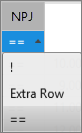
- Make the desired setting in the NPJ column:
|
| |
|
! |
Protect the stitch tension area against a stitch length change |
|
Rango extra |
Pattern row with different stitch lengths is divided, i.e. for each stitch length in one carriage stroke there will be entered a movement of the yarn carrier in the pattern. Result: Longer run time based on the moving of the yarn carrier (kick back). |
|
== |
Stitch tension change in both areas |
|
Setting |
Presentation |
Meaning |
|---|---|---|
|
= |
|
Stitch tension change in both areas |
|
!
|
|
Stitch tension change in the A area |
|
!
|
|
Stitch tension change in the Y area |
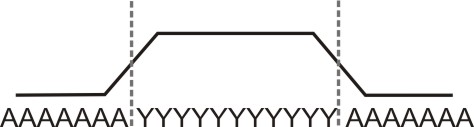
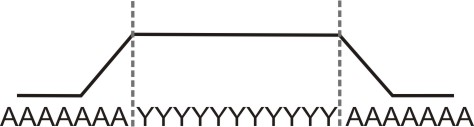
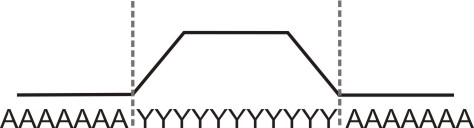
- The default carriage speed in the area of the stitch tension change is MSEC=1.0.
- With the Sintral command MSECNPJ, the carriage speed can be changed in the area of PTS / NPJ.
In the Avvio ribbon under Configurazione, open the Configurazione tool window, select the Sintral tab and in the section, activate the
  Utilizza MSECNPJ check box.
Carriage Speed and adjustment values
|
MSECNPJ |
1.0 |
0.9 |
0.8 |
0.7 |
0.6 |
0.5 | ||||||
|---|---|---|---|---|---|---|---|---|---|---|---|---|
|
|
y |
x |
y |
x |
y |
x |
y |
x |
y |
x |
y |
x |
|
E 3 |
1.3 |
1.2 |
1.2 |
1.1 |
1 |
1 |
0.9 |
0.8 |
0.8 |
0.7 |
0.7 |
0.6 |
|
E 3,5 |
1.6 |
1.3 |
1.4 |
1.2 |
1.3 |
1 |
1.1 |
0.9 |
1 |
0.8 |
0.8 |
0.7 |
|
E 5 (2,5.2) |
1.5 |
1.7 |
1.4 |
1.5 |
1.2 |
1.4 |
1 |
1.2 |
0.9 |
1 |
0.8 |
0.9 |
|
E 7 (3,5.2) |
2.1 |
2.1 |
1.9 |
1.9 |
1.7 |
1.7 |
1.5 |
1.5 |
1.3 |
1.3 |
1.1 |
1.1 |
|
E 8 |
2.4 |
2.3 |
2.2 |
2.1 |
1.9 |
1.8 |
1.7 |
1.6 |
1.4 |
1.4 |
1.2 |
1.2 |
|
E 10 (5.2) |
3 |
2.8 |
2.7 |
2.5 |
2.4 |
2.2 |
2.1 |
2 |
1.8 |
1.7 |
1.5 |
1.4 |
|
E 12 (6.2) |
3.6 |
3.3 |
3.2 |
3 |
2.9 |
2.6 |
2.5 |
2.3 |
2.2 |
2 |
1.8 |
1.7 |
|
E 14 (7.2) |
4.2 |
3.7 |
3.8 |
3.3 |
3.4 |
3 |
2.9 |
2.6 |
2.5 |
2.2 |
2.1 |
1.9 |
|
E 16 (8.2) |
4.8 |
4.2 |
4.3 |
3.8 |
3.8 |
3.4 |
3.4 |
2.9 |
2.9 |
2.5 |
2.4 |
2.1 |
|
E 18 (9.2) |
5.4 |
4.6 |
4.9 |
4.1 |
4.3 |
3.7 |
3.8 |
3.2 |
3.2 |
2.8 |
2.7 |
2.3 |
y = Quantity of needles for changing the stitch tension by one value
x = Quantity of needles for the idle time between the stitch tension change
Osservare le distanze tra i motivi e i tempi di riposo per consentire alla macchina di eseguire la modifica della lunghezza della maglia.