Create Narrowing Module for French Shoulder
Generate private narrowing module:
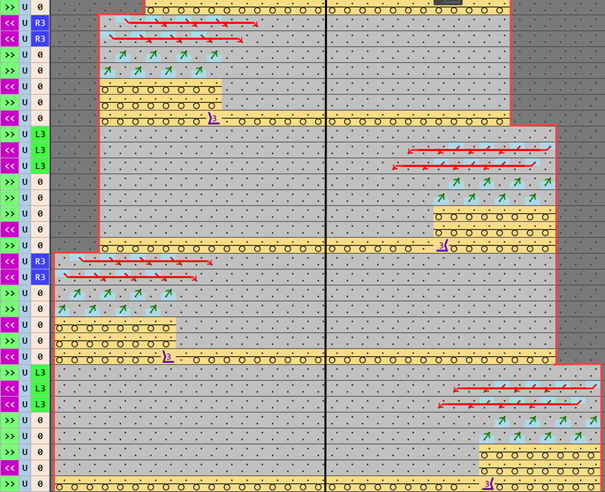
Narrowing procedure with knitting and transferring of a French shoulder
Left shape line - Shoulder | Right shape line - Shoulder |
| |
Watch out when generating modules:
- The narrowing module must be matched to the shape.
- The stepping for narrowing existing in the shape must be observed by the racking step in the module.
- 1
- Open the Explorer with
 Knit Explorer.
 - 2
- Open directory.
Deposito elementi di lavoro → fully fashion → Diminuzione . - 3
- Select Diminuzione, Trasporti separati module.
- 4
- Call-up
 Copia in the context menu.
- or –
Call up Copia in the ribbon of the Knit Explorer. - 5
- Call-up
 Incolla in the context menu of the same directory.
- or -
Call up Incolla in the ribbon of the Knit Explorer. - The copy appears in the directory.
- 6
- Change the name of the module.
- 7
- Open the module double clicking.
- The whole content of the module with all variants appears in a new instance of the CPS.
- 8
- Delete rows or variants which are no longer needed.
Keep this variants only:
- All Needles
- Racking by 3 needles
- For narrowing above and / or underneath
- 1
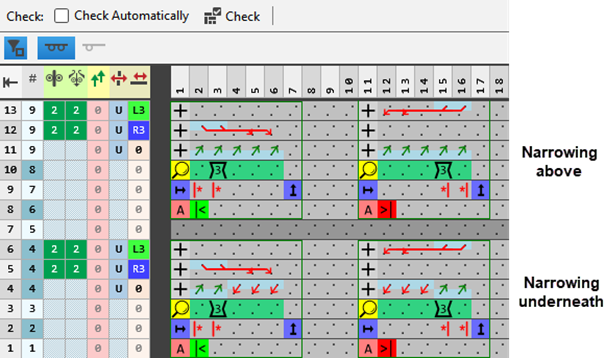
- Delete tiles (columns / rows) which are no longer needed.
|
- 1
- Insert the required quantity of rows in to both tiles:
- ForDiminuzione sottostante on all needles
- ForDiminuzione sovrapposta on all needles
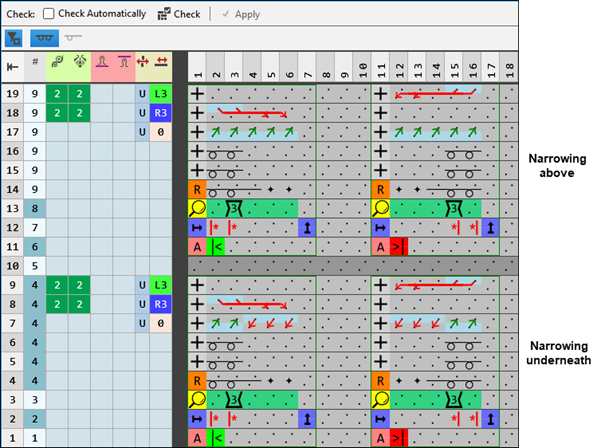
- 1
- Draw in the desired knitting process.
|
- 1
- Check the structure of the narrowing module by the
 Controllo: button.
  :
:
The knitting process itself will not be checked.
The correct structure of the tiles only will be checked.- 2
- Allocate the private narrowing module to shape lines of the shape.